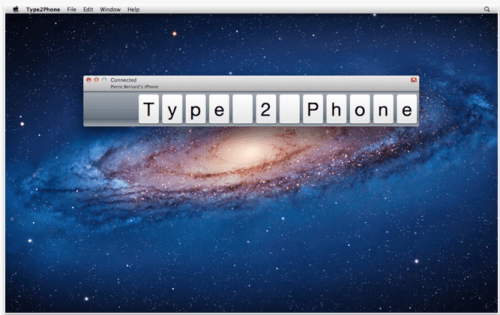
Houdah Software has announced the immediate availability of Type2Phone 1.3. Type2Phone turns your Mac into a Bluetooth keyboard for your iPhone, iPod touch or iPad. Type2Phone running on the Mac will emulate a Bluetooth keyboard. Pair your iOS device with the Mac while Type2Phone is running. Now every character you type is funneled through to the iOS device.
Use Type2Phone to: * Quickly type SMS text messages, notes, ... * Reply to emails on accounts configured only on your iPhone * Communicate with friends over your iPhone: Facebook, Twitter, chat * Paste addresses, passwords, ... from your Mac to your iPhone
Type2Phone also allows for pasting text from the Mac to the iOS device. Every character that could by typed can also be pasted. Just hit cmd-shift-V. It also supports text selection and copy-paste operations on the iOS device. Navigate text using the arrow key. Hold the shift key while navigating to select text. Use the cmd-C, cmd-V shortcuts to trigger copy-paste operations.
On the Mac, Type2Phone shows every character it has sent to the iOS device. An animated display of key tiles serves as stylish typing history.
Type2Phone 1.3 brings many enhancements and fixes: * 4 more keyboard layouts supported * Support for function keys * Support for media keys * Home and power buttons * Persistent display preferences * Bluetooth connection fixes
Pricing and Availability: Type2Phone 1.3 is priced at $4.99 (USD) or local equivalent. It is available exclusively from the Mac App Store in the Utilities category.
Apple news, rumors, tutorials, price drop alerts, in your inbox every evening, free.
Unsubscribe at any time.
Success!
You have been subscribed.
Add Comment
Would you like to be notified when someone replies or adds a new comment?
Yes (All Threads)
Yes (This Thread Only)
No
Notifications
Would you like to be notified when we post a new Apple news article or tutorial?
Yes
No
Comments (4)
Comments are closed for this article.
0
MSiqueira - January 22, 2012 at 5:34pm
Probably dumb question, but anyone knows how to perform a "send" key stroke to apps like iMessage, Whatsapp, etc.?
Thanks in advance
0
JW - January 10, 2012 at 8:39am
So, if it emulates a bluetooth keyboard, will it also work with a PS3???????
0
devin - January 9, 2012 at 10:18pm
Okay this is awesome!!! I have been looking everywhere for an app to let me send text messages from my computer.
0
veggiedude - January 10, 2012 at 2:55am
I would recommend Dropcopy over thhis. With Dropcopy, you can share a clipboard which means text, pictures or sound. You can also drag and drop files between Mac and iOS.





![Apple Releases iOS 26.4.1 and iPadOS 26.4.1 With Bug Fixes [Download]](/images/news/100492/100492/100492-160.jpg "Apple Releases iOS 26.4.1 and iPadOS 26.4.1 With Bug Fixes [Download]")

![Apple TV Debuts 'Criminal Record' Season 2 Trailer [Video]](/images/news/100488/100488/100488-160.jpg "Apple TV Debuts 'Criminal Record' Season 2 Trailer [Video]")






![13-inch MacBook Air M5 Drops to $949 in New All-Time Low [Deal]](/images/news/100466/100466/100466-160.jpg "13-inch MacBook Air M5 Drops to $949 in New All-Time Low [Deal]")




