

Purple Snowcone has announced myPhotoBooth 2.0, an update to their popular photo booth application for iPhone and iPod Touch. Designed specifically to leverage the iPhone's unique abilities and interface, myPhotoBooth lets anyone create authentic souvenir photo strips, just like from old photo booths.
Fun and easy-to-use, myPhotoBooth offers two layout styles with various color effects. Users can choose existing photos from their library or take new ones with the camera. myPhotoBooth features both color and black and white modes, with up to four photos per strip. Easily copy, paste, or swap photos in a layout. Go back to edit or modify existing photo strips at any time. In case of any interuption, a phone call, or accidentally hitting the home button, myPhotoBooth remembers a photo's arrangement in any layout, allowing at any time for users to pick up where they left off to finish a layout.
"I got the idea for myPhotoBooth out of the blue one day when I happened to be staring at a photo booth photo strip of my girlfriend and I," said Joe Mastromonaco, owner of Purple Snowcone. "A light bulb went off and I quickly searched the iTunes store to find anything like it. When the search came up empty I got to work that minute. About two weeks later I had myPhotoBooth 1.0 submitted."
Version 2.0 sports a completely redesigned user interface that makes it much easier to navigate. Users may browse all of their existing photo strips through a sleek cover-flow style interface. The application now automatically stores pictures taken within the app to the device's library. Pictures will now automatically fit the frame size, eliminating the need to resize and position.
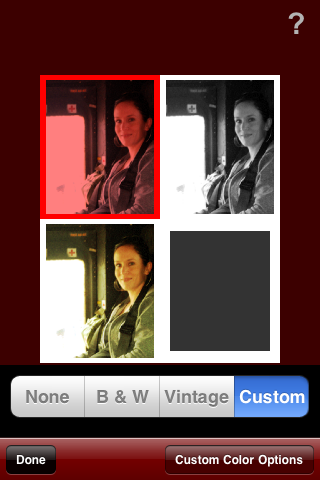
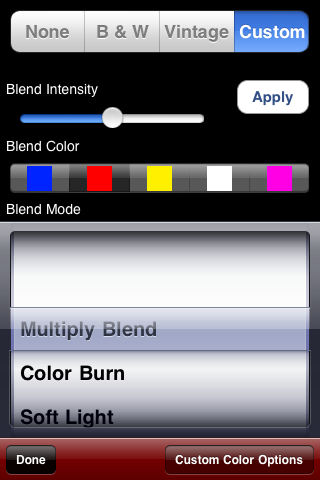
Among myPhotoBooth's most notable new features are the versatile social media sharing options. With a tap, users can easily email photo strips to family and friends directly from within the app, as well as directly upload to Facebook and Twitter. To round out the update, myPhotoBooth includes an additional preset 'Vintage' color effect, the ability to create user-defined custom color effects, a new 'black' border color option, and a special "double size" output resolution size, perfect for printing.
Redesigned from the ground up, myPhotoBooth 2.0 boasts the following new features:
* Redesigned interface makes it much easier to navigate
* Browse existing photo strips through a sleek cover-flow style interface
* E-mail photo strips from directly within the app
* Directly upload to Facebook and Twitter
* Additional preset color effect for 'Vintage' coloring
* Ability to create custom color effects
* Pictures automatically fit frame size
* Added 'black' border color option
* Copy, Paste, Swap photo's easily from one spot to another
* Go back to edit or modify existing photo strips at any time
* Added "double size" output resolution size
* Automatically store pictures taken within the app to device library
* Detailed help / how-to explains features
Pricing and Availability:
myPhotoBooth 2.0 is only $1.99 (USD) and available exclusively through the App Store in the Photography category.
Fun and easy-to-use, myPhotoBooth offers two layout styles with various color effects. Users can choose existing photos from their library or take new ones with the camera. myPhotoBooth features both color and black and white modes, with up to four photos per strip. Easily copy, paste, or swap photos in a layout. Go back to edit or modify existing photo strips at any time. In case of any interuption, a phone call, or accidentally hitting the home button, myPhotoBooth remembers a photo's arrangement in any layout, allowing at any time for users to pick up where they left off to finish a layout.
"I got the idea for myPhotoBooth out of the blue one day when I happened to be staring at a photo booth photo strip of my girlfriend and I," said Joe Mastromonaco, owner of Purple Snowcone. "A light bulb went off and I quickly searched the iTunes store to find anything like it. When the search came up empty I got to work that minute. About two weeks later I had myPhotoBooth 1.0 submitted."
Version 2.0 sports a completely redesigned user interface that makes it much easier to navigate. Users may browse all of their existing photo strips through a sleek cover-flow style interface. The application now automatically stores pictures taken within the app to the device's library. Pictures will now automatically fit the frame size, eliminating the need to resize and position.
Among myPhotoBooth's most notable new features are the versatile social media sharing options. With a tap, users can easily email photo strips to family and friends directly from within the app, as well as directly upload to Facebook and Twitter. To round out the update, myPhotoBooth includes an additional preset 'Vintage' color effect, the ability to create user-defined custom color effects, a new 'black' border color option, and a special "double size" output resolution size, perfect for printing.
Redesigned from the ground up, myPhotoBooth 2.0 boasts the following new features:
* Redesigned interface makes it much easier to navigate
* Browse existing photo strips through a sleek cover-flow style interface
* E-mail photo strips from directly within the app
* Directly upload to Facebook and Twitter
* Additional preset color effect for 'Vintage' coloring
* Ability to create custom color effects
* Pictures automatically fit frame size
* Added 'black' border color option
* Copy, Paste, Swap photo's easily from one spot to another
* Go back to edit or modify existing photo strips at any time
* Added "double size" output resolution size
* Automatically store pictures taken within the app to device library
* Detailed help / how-to explains features
Pricing and Availability:
myPhotoBooth 2.0 is only $1.99 (USD) and available exclusively through the App Store in the Photography category.


![Apple Releases iOS 26.4.1 and iPadOS 26.4.1 With Bug Fixes [Download]](/images/news/100492/100492/100492-160.jpg "Apple Releases iOS 26.4.1 and iPadOS 26.4.1 With Bug Fixes [Download]")

![Apple TV Debuts 'Criminal Record' Season 2 Trailer [Video]](/images/news/100488/100488/100488-160.jpg "Apple TV Debuts 'Criminal Record' Season 2 Trailer [Video]")






![13-inch MacBook Air M5 Drops to $949 in New All-Time Low [Deal]](/images/news/100466/100466/100466-160.jpg "13-inch MacBook Air M5 Drops to $949 in New All-Time Low [Deal]")




