Posted January 20, 2010 at 12:41pm by
Yoav Levytam
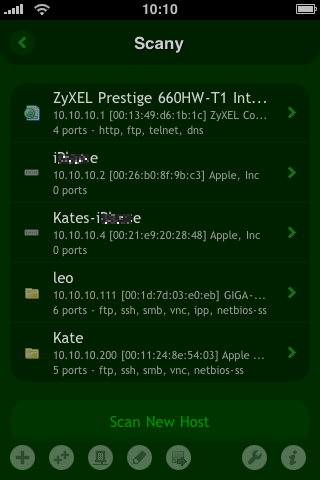
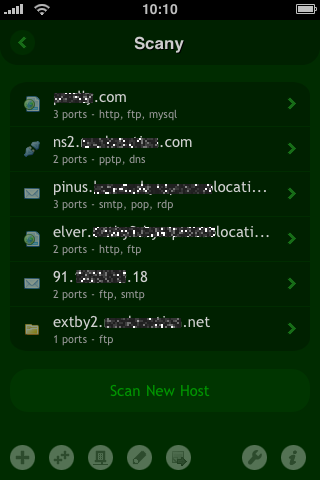
Happymagenta has announced Scany 1.5, an update to their popular network exploration tool for iPhone and iPod touch. Developed specifically to leverage the iPhone's peerless capabilities, Scany will effortlessly scan individual hosts or network ranges on the Internet or LAN for running services (open ports) as well as dig for other useful information.
Perfect for IT administrators on-the-go and casual use alike, Scany offers a natural, easy-to-use interface and features a state-of-the-art asynchronous network engine backed by over 15 years of networking experience. It can scan by either IP address or any IP network range (both LAN and WAN) for hosts and services and can run in several different modes. Besides Mac and PC hostnames, Scany recognizes names of networking capable devices such as game consoles, media servers, TVs, receivers, players, printers, web cameras, routers, switches and many others.
With Scany's integrated whois, it is the ultimate tool to access virtually all info about a given host that can be discovered over a network. Easily scan for hostname, IP address, IP network range, autonomous system (AS) number, reverse hostname (PTR DNS record), Bonjour or Windows (NetBIOS) hostname, country of the network owner, services host runs (TCP and UDP open ports), firewall detection results, ping test results, round trip time, MAC address, vendonr as well as WHOIS info.
Feature Highlights: * Scan both LAN and the Internet * Scan any IP address or network range * Bonjour hostnames lookup * Windows (NetBIOS, Samba) hostnames lookup * Device names lookup (UPnP, SSDP, DLNA) * Country of origin detection of the network owner * Network range and AS number lookup * MAC address and hardware vendor lookup * Wake on LAN or Wi-Fi (by MAC address) * Wake over the Internet (using proper routers) * Ping hosts with integrated tool * WHOIS hostnames, IP addresses, ASNs * Know Wi-Fi, VPN, 3G/EDGE and external IPs * Group results into multiple histories * E-mail scan results * Predefined services for your convenience * Possibility to add custom services * Checks ICMP, TCP and UDP * Faster asynchronous network I/O * Works with Wi-Fi, 3G, EDGE and GPRS * Eye-pleasing interface design
Displays host information (when available): * Hostname * IP address * IP network range * Autonomous system (AS) number * Reverse hostname (PTR DNS record) * Bonjour hostname * Windows hostname * Device name (UPnP, SSDP, DLNA) * Country of the network owner * Services host runs (TCP and UDP open ports) * Firewall detection results * Ping test results * Round trip time (RTT) * MAC address and vendor * WHOIS
Version 1.5 sports many key new features and UI improvements. Scany can now ping hosts using integrated tool, show external IP and network details, as well as detect more of UDP services in improved way. The application also exports one or more hosts for Net Status application and remembers last targets for rescannig. Wake on LAN feature has been also improved to work with bigger network ranges.
What's New: * Ping hosts using integrated tool * Know external IP and network details * Improved detection for UDP ports * Export hosts for Net Status application * Last targets memorized for rescannig * More info shown in host details * Wake on LAN improved for bigger ranges
"More and more people are now plugging media servers, TVs, game consoles and other devices into their home networks," said Pavel Ahafonau, founder and CEO of Happymagenta. "As a result, we made our network scanner to recognize such devices and their names instead of just reporting anonymous IP addresses."
Pricing and Availability: Scany 1.5 is on sale for only $0.99 (USD) and available worldwide exclusively through the App Store in the Utilities category. Review copies are available upon request.




![Apple Releases iOS 26.4.1 and iPadOS 26.4.1 With Bug Fixes [Download]](/images/news/100492/100492/100492-160.jpg "Apple Releases iOS 26.4.1 and iPadOS 26.4.1 With Bug Fixes [Download]")

![Apple TV Debuts 'Criminal Record' Season 2 Trailer [Video]](/images/news/100488/100488/100488-160.jpg "Apple TV Debuts 'Criminal Record' Season 2 Trailer [Video]")






![13-inch MacBook Air M5 Drops to $949 in New All-Time Low [Deal]](/images/news/100466/100466/100466-160.jpg "13-inch MacBook Air M5 Drops to $949 in New All-Time Low [Deal]")




