Independent iPhone developer Jeremy Bassett has announced iGrayCards 1.0 for iPhone and ipod touch, an alternative for the photo enthusiast to carrying physical Gray Cards. iGrayCards digitally generates a neutral 18% gray that can be used to balance white in image processing software.
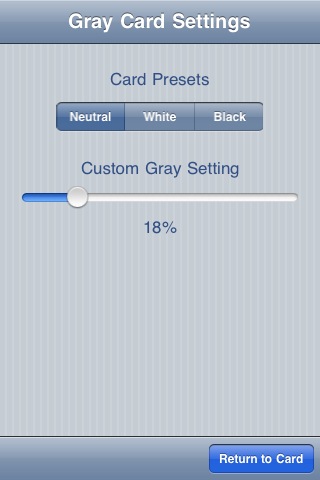
The card can also be set to any gray setting from black to white, giving a wide range of gray cards in the photographer's pocket. 18% Gray is the industry standard used by professional photographers worldwide to compensate for different lighting situations. iGrayCards is the digital solution for the iPhone.
iGrayCards features: * 436 x 320 pixel digitally generated card * 18% Neutral Gray default setting * Slider Control for setting 0 - 100% Gray * Card Presets * Info displaying Preset or Custom Setting when card is displayed
iGrayCards is the ideal App for the digital photo enthusiast who does not carry or own Gray Cards. Simply by including the running App in the frame to be photographed, it can be referenced in most modern image processing software to set the White Balance point for the whole image. Using just one image a whole set of images taken under the same lighting conditions can be set. Each generated Gray Card using the custom setting is digitally calculated to be perfectly accurate and the slick user interface enables the user to swap between the generated card and settings with one touch.
Supports all leading Image Processing Software including: * Photoshop * Lightroom * Google Picasa * PaintShop Pro * Aperture
Pricing and Availability: iGrayCards 1.0 is only $0.99 (USD) and available worldwide exclusively through the App Store in the Photography category.




![Apple Releases iOS 26.4.1 and iPadOS 26.4.1 With Bug Fixes [Download]](/images/news/100492/100492/100492-160.jpg "Apple Releases iOS 26.4.1 and iPadOS 26.4.1 With Bug Fixes [Download]")

![Apple TV Debuts 'Criminal Record' Season 2 Trailer [Video]](/images/news/100488/100488/100488-160.jpg "Apple TV Debuts 'Criminal Record' Season 2 Trailer [Video]")






![13-inch MacBook Air M5 Drops to $949 in New All-Time Low [Deal]](/images/news/100466/100466/100466-160.jpg "13-inch MacBook Air M5 Drops to $949 in New All-Time Low [Deal]")




