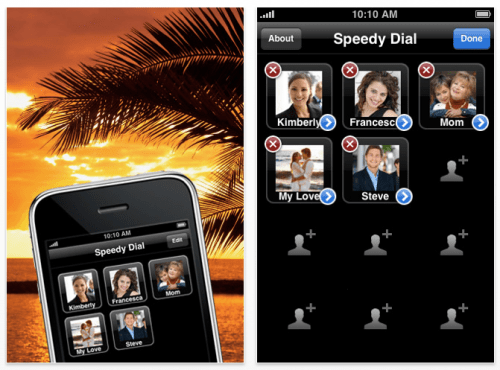
Apimac has announced Speedy Dial 1.4, their new speed dial app for iPhone devices. Touch and call. In a couple of days it will become one of the applications that you will use more on your iPhone. Nothing can be as fast as your eyes, so with Speedy Dial, you'll quickly know where to tap to call one of your 12 most important contacts. Assign to each contact a photo, a phone number and a name, got directly from the iPhone's Contacts app, or entered by you.
The name can be customized as you like, if for example you are a girl and instead of John, you prefer to write "Love", go ahead! The program is here for it! The image that is assigned to a contact is customizable, if for example you do not like the photo of your boss, you can replace it with the image you want, a girl who uses the app, confessed to using a photo of a cactus to identify their boss!
Every time you want to call someone, open the app and tap on the picture of that person. Will be so nice to call your contacts with Speedy Dial that when happen to have to call someone who you did not enter into Speedy Dial, perhaps you will feel tedious to go through a list of names looking for the right contact. Speedy dial is so natural and immediate to use that you will love to touch your contacts!
Pricing and Availability: Speedy Dial 1.4 is only $0.99 USD (or equivalent amount in other currencies) and available worldwide exclusively through the App Store in the Utilities category.




![Apple Releases iOS 26.4.1 and iPadOS 26.4.1 With Bug Fixes [Download]](/images/news/100492/100492/100492-160.jpg "Apple Releases iOS 26.4.1 and iPadOS 26.4.1 With Bug Fixes [Download]")

![Apple TV Debuts 'Criminal Record' Season 2 Trailer [Video]](/images/news/100488/100488/100488-160.jpg "Apple TV Debuts 'Criminal Record' Season 2 Trailer [Video]")






![13-inch MacBook Air M5 Drops to $949 in New All-Time Low [Deal]](/images/news/100466/100466/100466-160.jpg "13-inch MacBook Air M5 Drops to $949 in New All-Time Low [Deal]")




