Apple HomeView vs. Echo Show: Which Smart Display Should You Buy?
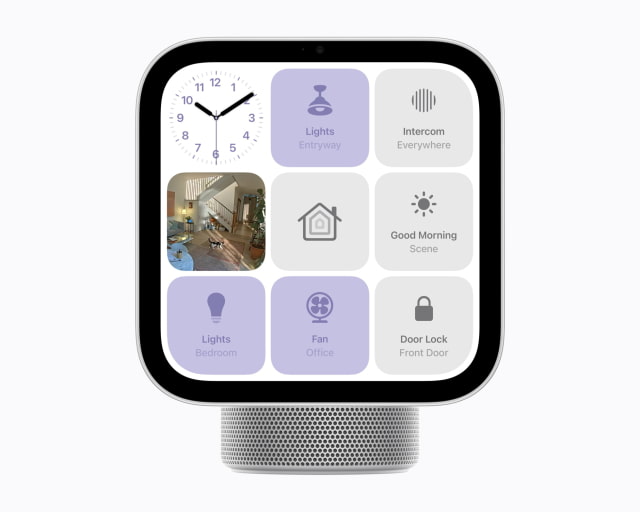
Apple's tabletop HomeView gives an iPhone household something an Echo Show has been missing: a shared screen for FaceTime, Messages, and Apple Home. You can take a call while making dinner or check your calendar without reaching for your phone, and the display recognizes who is using it.
Amazon's 2025 Echo Show 8 and Echo Show 11 offer bigger screens for less money, work with Android phones as well as iPhones, and have built-in connections for more types of smart-home accessories.
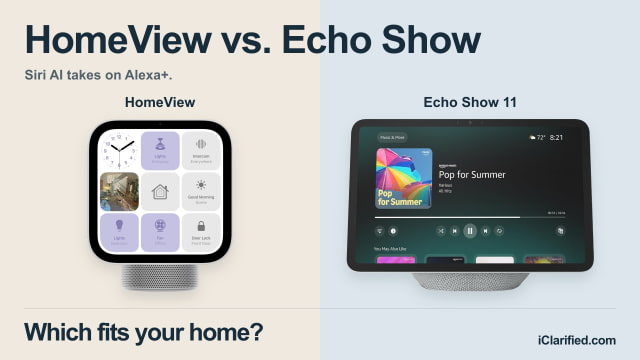
A Shared Screen With Your Own Apps
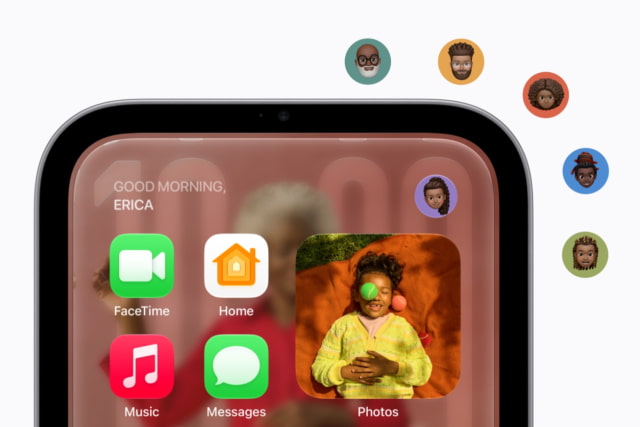
Apple HomeView recognizes up to six enrolled people by their faces and brings up each person's apps and information. Your messages, calendar, and reminders stay separate from everyone else's, while shared photos and music remain available to the household.
Your paired iPhone or iPad still needs to be nearby to access personal content. Normally, HomeView must recognize your face and that device must be on the same Wi-Fi network and recently unlocked. Apple also allows temporary access over cellular if the paired device was recently on that network, remains at the same location, and has been recently unlocked.
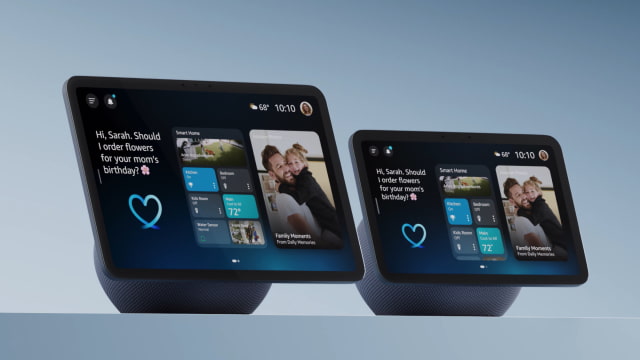
Echo Show uses Visual ID to recognize you and show personalized information, including calendars and Amazon Photos. The Alexa app works on both iOS and Android, making it easier to set up and manage the display in a household where not everyone has an iPhone.
Echo Show Gives You More Room
HomeView has a square 7-inch display, compared with 8.7 inches on Echo Show 8 and 10.95 inches on Echo Show 11. Amazon's wider screens give videos more room, and Show 11 is particularly appealing for a calendar or recipe you want to see from across the counter.
HomeView is easier to fit on a small shelf or bedside table. It is 145.5mm wide, against 208mm for Show 8 and 255mm for Show 11, and its built-in hinge lets you tilt the screen. Amazon's adjustable stand costs extra.
HomeView can also dim to 0.3 nits at night, down from a maximum of 500 nits. That should make it less distracting beside a bed. All three displays need to stay plugged in; none has a battery for carrying it around the house.
FaceTime or Alexa Calling?
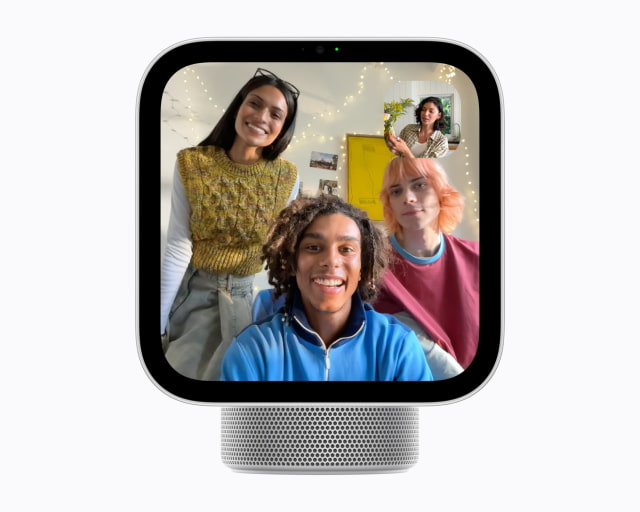
If your family already calls over FaceTime, HomeView lets you keep doing that without propping up an iPhone or iPad. Its 12-megapixel Center Stage camera adjusts the framing as you move or someone else joins you in front of the screen.
Both Echo Shows have a 13-megapixel camera with automatic framing. They use Alexa calling and Drop In, so they fit well with other Echo devices but do not offer native FaceTime. Someone who normally calls you through FaceTime would need to use Alexa calling instead.
Check Your Streaming Apps and Smart-Home Accessories
Echo Show 8 and 11 have Prime Video and Netflix apps, according to Amazon's current listings. Other video services rely on the browser where supported. Neither has the full Fire TV app selection available on the larger Echo Show 15 and 21.
HomeView has no App Store. It comes with Apple apps and supports compatible third-party audio and video apps from your iPhone. In WIRED's launch hands-on, Spotify was available, but dedicated YouTube, Netflix, and Disney+ apps were not. More services could arrive as developers adapt their CarPlay apps for HomeView, but the selection at launch will be much narrower than an iPad's.
For lights, locks, and cameras, HomeView brings your compatible Apple Home accessories together and supports Matter and Thread. The Echo Shows also have a built-in Zigbee hub alongside Matter and Thread, so they can connect directly to compatible Zigbee accessories without a separate hub. Existing Apple Home users have little reason to rebuild their setup around Alexa, but Echo's broader hub support is useful if you already own Zigbee devices.
Privacy Controls and the Cost of the Assistant
HomeView's face and voice recognition runs inside protected parts of the A18 chip called Secure Exclaves. Apple says the operating system and Apple itself cannot access the camera and microphone data processed there. The Echo Shows offer a button to disable the microphones and camera, separate camera controls, and the option to review and delete voice recordings.
To enable Siri AI on HomeView, the person listed as the home's owner in the Home app needs an Apple Intelligence-capable iPhone or iPad with the latest software and Siri AI enabled in a supported language. Other people can then use general AI conversations; requests involving their own personal information need their own eligible paired device.
Basic HomeView setup requires iOS 27.2 or iPadOS 27.2 or later. Siri AI starts in beta, with English support and daily limits on some server-based features. Apple plans paid expanded access later.
In the U.S., full Alexa+ access on an Echo Show is included with Prime or costs $19.99 a month without it after any introductory access. Amazon's free Alexa+ chat tier for nonmembers is limited to the app and website, not the full experience on the display. Music, video, and some camera features can require separate subscriptions on either platform.
Prices and Specifications
HomeView is available to pre-order on Amazon ahead of its November 13 release. Apple's price is $299, while the U.S. retail prices for Echo Show 8 and Echo Show 11 are $199.99 and $249.99. We've already seen HomeView pre-order discounts on select colors, so check the offer for the finish you want.
The tabletop HomeView includes its USB-C cable and 30W adapter. Apple's separate wall-mounted version also costs $299, but loses the base's woofer and passive radiators and requires mounting and power accessories sold separately. The specifications below are for the tabletop model.
| Feature | HomeView (tabletop) | Echo Show 8 / 11 (2025) |
|---|---|---|
| U.S. device price | $299 | 8: $199.99; 11: $249.99 |
| Display | 7-inch square LCD; 1088 × 1088 | 8: 8.7-inch, 1340 × 800; 11: 10.95-inch, 1920 × 1200 |
| Camera | 12MP Center Stage | Both: 13MP, automatic framing |
| Speakers | Two full-range drivers, woofer, two passive radiators | Both: two full-range drivers and 2.8-inch woofer |
| Video calling | FaceTime | Both: Alexa video calls and Drop In |
| Home connectivity | Apple Home; Matter-compatible accessories and Thread | Both: Zigbee, Matter, Thread border router |
| Chip | A18 | Both: AZ3 Pro |
| Wi-Fi | Wi-Fi 6E | Both: Wi-Fi 6E |
| Bluetooth | Bluetooth 6 | Both: Bluetooth 5.4 |
| Dimensions | W: 145.5mm; H: 136.7–173.2mm; D: 96–130.2mm | 8: 208 × 150 × 127mm; 11: 255 × 182 × 127mm (W × H × D) |
| Weight | 952g | 8: 1049g; 11: 1302g |
| Power | Wired; 30W adapter and USB-C cable included | Both: wired; 30W adapter included |
| Screen adjustment | Built-in tilt hinge | Adjustable stand sold separately |
| Setup | iPhone with iOS 27.2+ or iPad with iPadOS 27.2+ | Alexa app: iOS, Android, Fire OS; Amazon account |
| Finishes | Silver, Starlight, Rose Pink, Space Gray | Glacier White or Graphite |
Which Should You Buy?
HomeView is our first choice for a family that wants FaceTime, Messages, and Apple Home on a shared screen. We would pay more for those connections rather than move the family's calls and home controls to Alexa. Before pre-ordering, check HomeView's app and setup requirements, particularly if Siri AI or a specific streaming service is the main attraction.
Echo Show is the better fit if you already rely on Alexa routines and compatible accessories, or want a larger display for Prime Video and Netflix. Show 8 keeps the cost down; Show 11 gives you the most room for video, recipes, and calendars. An Echo that already does those jobs well is worth keeping. HomeView is not due until November, and we have not tested the two side by side.
You can pre-order HomeView on Amazon, or check current offers on Echo Show 8 and Echo Show 11.

![Apple Hires Meta's Scott Tucker as Global Litigation Chief [Report]](/images/news/102873/102873/102873-160.jpg "Apple Hires Meta's Scott Tucker as Global Litigation Chief [Report]")



![How To Install Homebrew on Mac [Video]](/images/tutorials/83695/83695/83695-160.jpg "How To Install Homebrew on Mac [Video]")
![How To Back Up Your iPhone to an External Drive on Mac [Video]](/images/tutorials/72786/72786/72786-160.jpg "How To Back Up Your iPhone to an External Drive on Mac [Video]")


![Apple HomeView and New Apple TV 4K Get First Pre-Order Discount on Amazon [Deal]](/images/news/102867/102867/102867-160.jpg "Apple HomeView and New Apple TV 4K Get First Pre-Order Discount on Amazon [Deal]")
![14-Inch MacBook Pro With M5 Max Drops to $3,299 ($800 Off) [Deal]](/images/news/102828/102828/102828-160.jpg "14-Inch MacBook Pro With M5 Max Drops to $3,299 ($800 Off) [Deal]")