

Apple Updates Mac Chargers and World Travel Adapter Kit With New Connector
Apple has released updated 70W and 140W Mac power adapters, a Power Adapter Extension Cable, and a new World Travel Adapter Kit. All four use AC Connector 2, a revised attachment for the removable wall plug that is not compatible with the older design.
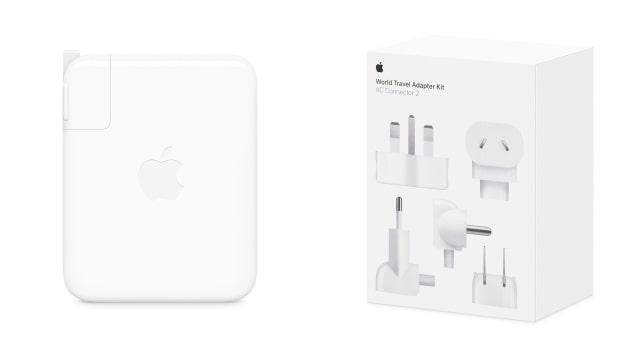
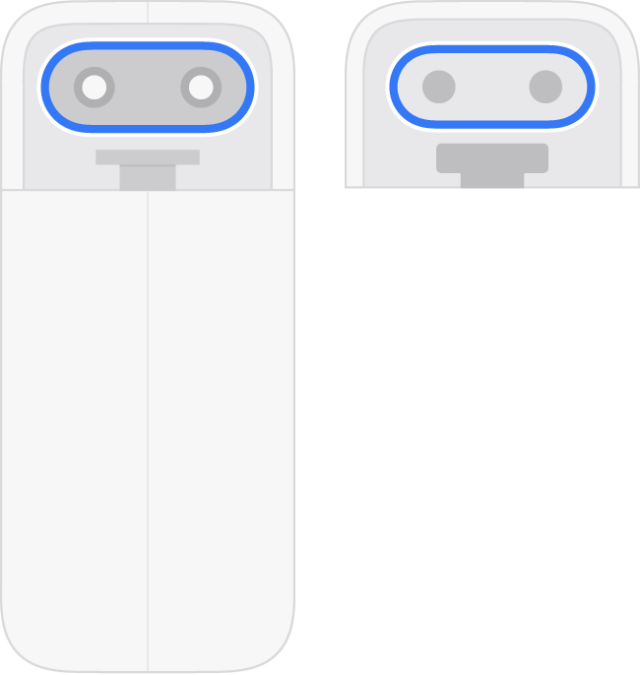
The change is on the wall-outlet side of the charger, not its USB-C charging port. Apple attributes the redesign to updated regulations. The new connector has a pill-shaped profile, replacing the notched AC Connector 1 used by older plugs and extension cables.
Those two types are not interchangeable. An older travel plug or extension cable will not fit an AC Connector 2 power adapter, and the new accessories cannot be used with an AC Connector 1 charger. Matching the wattage alone is not enough; the physical connector also has to match.

The 70W Power Adapter costs $59 in the U.S., while the 140W Power Adapter is $99. Both retain USB-C output, with the charging cable sold separately. Apple recommends the smaller adapter for the 14-inch MacBook Pro and 13-inch or 15-inch MacBook Air, and the larger one for the 16-inch MacBook Pro.
The $19 Power Adapter Extension Cable adds 1.8 meters of reach and is offered in AC Connector 1 and AC Connector 2 versions. The Store lists the older connector for its 35W Dual Port and 96W adapters, and the new connector for the updated 70W and 140W models.
At $39, the World Travel Adapter Kit includes five interchangeable AC plugs for the new 70W and 140W chargers. They cover Type A outlets in North America and Japan; Type C in continental Europe and Brazil; Type D in India; Type G in the UK, United Arab Emirates, Saudi Arabia, and Singapore; and Type I in Australia and New Zealand.
The accessories are available to order from Apple alongside the new MacBook Pro models with PROLED XDR touchscreens announced today.



![Apple Shares New Touchscreen MacBook Pro Ad [Video]](/images/news/103164/103164/103164-160.jpg "Apple Shares New Touchscreen MacBook Pro Ad [Video]")
![How To Turn Off iPhone [Video]](/images/tutorials/94999/94999/94999-160.jpg "How To Turn Off iPhone [Video]")
![How To Back Up Your iPhone to an External Drive on Mac [Video]](/images/tutorials/72786/72786/72786-160.jpg "How To Back Up Your iPhone to an External Drive on Mac [Video]")

![How To Find Your IP Address on iPhone [Video]](/images/tutorials/496/496/496-160.jpg "How To Find Your IP Address on iPhone [Video]")


![Beats Headphones, Earbuds, and Pill Speaker Are Up to 41% Off [Deal]](/images/news/103026/103026/103026-160.jpg "Beats Headphones, Earbuds, and Pill Speaker Are Up to 41% Off [Deal]")

![New Fire TV Stick 4K Drops to $29.99 (50% Off) [Deal]](/images/news/102984/102984/102984-160.jpg "New Fire TV Stick 4K Drops to $29.99 (50% Off) [Deal]")
![Apple's iPhone 18 Pro and Pro Max Cases Are Up to 37% Off [Deal]](/images/news/102978/102978/102978-160.jpg "Apple's iPhone 18 Pro and Pro Max Cases Are Up to 37% Off [Deal]")
