App artist deeje has announced the 2nd major release of tappr.tv for iPad, iPhone, and iPod touch, which now offers users the ability to create and save dynamic visual loops with multiple tracks.
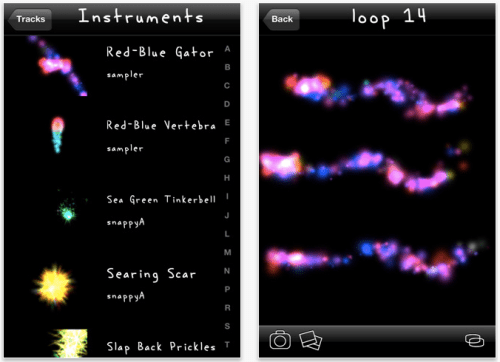
What is tappr.tv? DJs scratch audio records, VJs make visuals to music. tappr.tv is a new kind of "visual scratching" entertainment app for iOS that let's users make their own dynamic visuals using over 100 particle-based "instruments". Each instrument uniquely responds to the user's touches and tilts with bursts of colorful particles and light. It's relaxing all on its own, or play along with your favorite music.
"With version 2, tappr.tv adds critical saving and layering functionality, allowing you to create beautiful, dynamic visuals that you can enjoy over and over again," said deeje. "Create a bunch of loops, prop your device up, go into fullscreen mode, and enjoy the show!"
Features include: * Particle-based Visualizer * Touch and Tilt Inputs * Saved Loops * Multiple Tracks per Loop * Fullscreen Playback * Instrument and Loop Stepping * Video Out Support * 7 built-in instruments * 100s of Downloadable Instruments * Snapshots with Social Sharing * Feature Voting and Suggestions
Future releases will provide functionality for synchronizing tracks with favorite songs from your iPod library, audio input, editing instruments, and network collaboration. The ultimate vision for tappr.tv is the ability to create and share visuals for your favorite songs online.
Pricing and Availability: tappr.tv 2.1 is free and available worldwide exclusively through the App Store in the Entertainment category.



![Apple Targets October 27 for Touchscreen MacBook Pro and OLED iPad mini [Report]](/images/news/102696/102696/102696-160.jpg "Apple Targets October 27 for Touchscreen MacBook Pro and OLED iPad mini [Report]")
![LG Home Accessories Could Offer HomeKit-Exclusive NFC Setup Without Power [Leak]](/images/news/102687/102687/102687-160.jpg "LG Home Accessories Could Offer HomeKit-Exclusive NFC Setup Without Power [Leak]")

![Apple Names Steve Smith M&A Chief, Promotes App Store Leader [Report]](/images/news/102690/102690/102690-160.jpg "Apple Names Steve Smith M&A Chief, Promotes App Store Leader [Report]")

![How To Force Restart iPhone [Video]](/images/tutorials/95012/95012/95012-160.jpg "How To Force Restart iPhone [Video]")
![How To Turn Off iPhone [Video]](/images/tutorials/94999/94999/94999-160.jpg "How To Turn Off iPhone [Video]")
![How To Back Up Your iPhone to an External Drive on Mac [Video]](/images/tutorials/72786/72786/72786-160.jpg "How To Back Up Your iPhone to an External Drive on Mac [Video]")




![Mac mini Drops to $779.99 for Prime Big Deal Days [Deal]](/images/news/102624/102624/102624-160.jpg "Mac mini Drops to $779.99 for Prime Big Deal Days [Deal]")