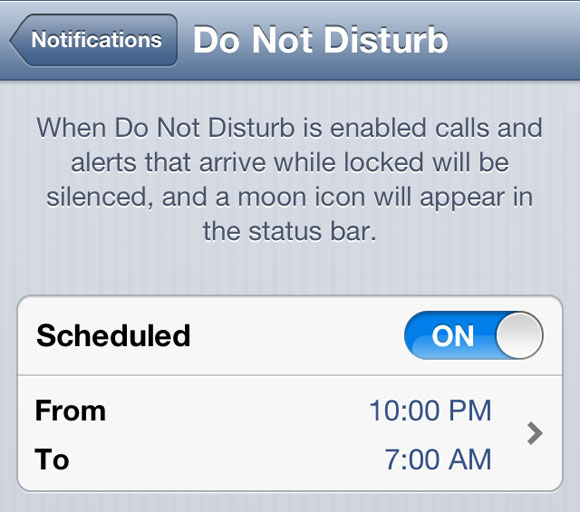
Users are reporting that their iOS 6 'Do Not Disturb' setting isn't turning off as scheduled today. You use the Do Not Disturb setting while your iOS device is locked to silence calls, alerts, and notifications.
Spacesamurai, a MacRumors forum member says, "I am in Japan so it is 2013, and I am finding that my iOS devices (iPhone 4 and iPad 2) are showing "Do Not Disturb" even though it is outside of the time I set for them. Not sure if this is related to the new year. Reloading the devices does not help and the software is up-to-date."
Interestingly, not everyone is reporting the issue. If you are, turning the setting off then back on appears to resolve the problem.
Apple news, rumors, tutorials, price drop alerts, in your inbox every evening, free.
Unsubscribe at any time.
Success!
You have been subscribed.
Add Comment
Would you like to be notified when someone replies or adds a new comment?
Yes (All Threads)
Yes (This Thread Only)
No
Notifications
Would you like to be notified when we post a new Apple news article or tutorial?
Yes
No
Comments (25)
Comments are closed for this article.
0
Ruben - January 7, 2013 at 1:38pm
Today is the 7th and looks like as promised Do not Disturb is back to normal, apparently.
0
Ruben - January 7, 2013 at 1:42pm
Disregard my previous message, DND is still not working.
0
dancj - January 7, 2013 at 1:45pm
Really? It seems fine on mine now - and mine was hit by the bug before.
0
Kristin - January 4, 2013 at 10:56am
Same problem for me, in Europe using the 24h clock. None of the solutions have worked. Hope it gets fixed fast - this is in theory a great feature!
0
rajdeep - January 2, 2013 at 3:13pm
i have also noticed the same problem today about an hour a go so i switched it off, i havent seen it after that.
0
Zhalla - January 2, 2013 at 12:43pm
the same problem here and not resolved
0
Dejan - January 2, 2013 at 9:52am
No problems at all.
0
dancj - January 2, 2013 at 8:01am
The problem's still there on the 2nd January - and the workaround did noting for me so it looks like I'm waiting for the next iOS update before I can use Do Not Disturb.
0
Gercom76 - January 2, 2013 at 1:32am
i am in venezuela, on december 31 few minutes before 12 am my iphone 4S start to reboot by itself, i don't have jailbreak in my iphone, after a hard reboot i can see the half moon for few seconds and the "do not disturb" was no activate, but after that event my iphone go back to normal state.
0
Amit - January 1, 2013 at 11:23pm
Have same problem and it cannot be resolved by switching off and on the options provided.
0
Aditya Garg - January 1, 2013 at 8:41pm
Absolutely true. It happened with me also. I thought it a mistake from side. I may have mistakenly left it on or something else.
0
Leggoman - January 1, 2013 at 7:11pm
Well it worked ok until I turned my phone on/off again. Now I have the moon icon on all the time if I use Do Not Disturb. An update is needed to address this coding issue.
0
MUKAI - January 1, 2013 at 7:01pm
I saw the little moon icon and realized I had 2 missed calls and a text because the setting did not turn off as expected.
0
Ruben - January 1, 2013 at 7:01pm
Well, I'm having the same issue and tried this morning plenty of times turning on and off even changing the silent times, still stays on. There is a bug there. Oh, and I'm in Miami, eastern time !!
0
Ruben - January 1, 2013 at 7:11pm
Grrrr...giving another reason to the Galaxy people to mock the iPhone ....by the way iClarified, not everyone is reporting the issue maybe because not everyone uses it or they might not notice it.
0
tzvifiller - January 1, 2013 at 6:53pm
Pls update iOS software!
0
Leggoman - January 1, 2013 at 6:52pm
Turn on 24 hour setting and it should work? I had 12 hour clock and no matter what time setting it was on it did not turn off. Change to 24 hour clock and it works fine. Another bad bit of coding by apple
0
Joel Ross - January 1, 2013 at 6:49pm
Same problem in iPod touch 4th Gen. iOS 6.
0
Facu - January 1, 2013 at 6:47pm
Same problem iphone 5 iOS 6.0.1
0
Leggoman - January 1, 2013 at 6:38pm
I have the same on ip4s ios6.01 turning on/off has not helped.
0
Brock - January 1, 2013 at 6:36pm
I have the same problem on my iPhone five and iPad