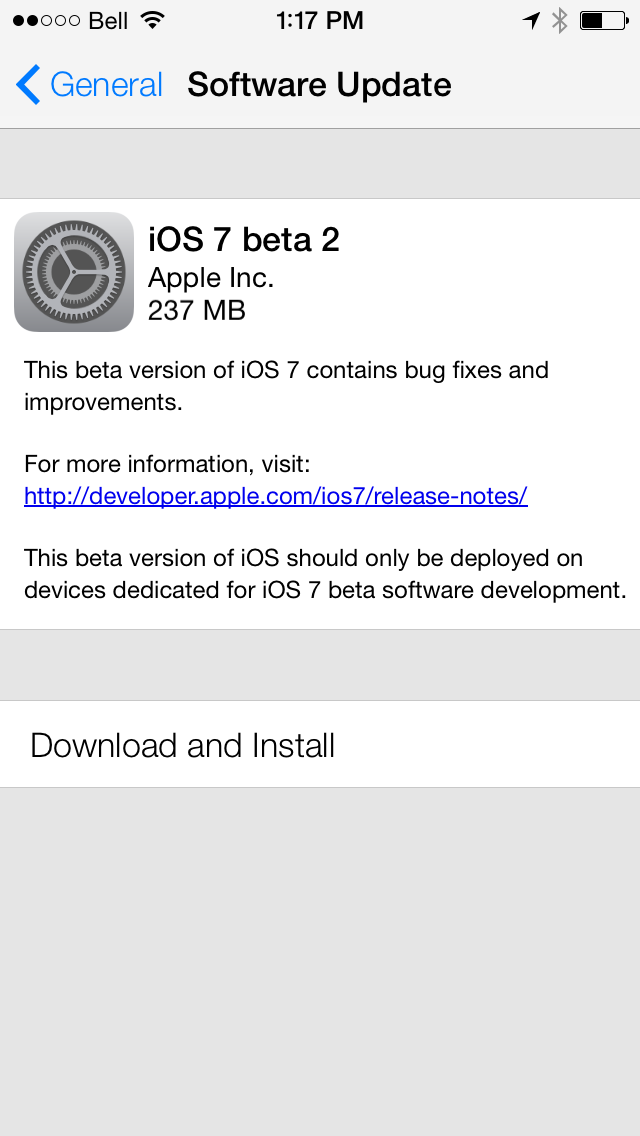
Apple is reportedly planning to release iOS 7 Beta 3 on July 8th, two weeks after the company released the second beta of its mobile operating system.
BGR, who correctly predicted the release of the second beta, says its been informed by trusted sources that the third beta will be available to carriers for testing on the 8th.
These are the same sources who accurately foretold the release timing of Apple’s last iOS 7 beta, and just like iOS 7 beta 2, it is likely that the new software will be released to developers on the same day it reaches carriers. Apple finally began supporting the iPad in iOS 7 beta 2, so we should see beta 3 made available for all iOS devices at the same time, including compatible iPhone, iPad, iPod touch and even Apple TV models.
The site says Apple is still working to refine the design of iOS 7 and we could see some tweaks in the new firmware.
[via Tzvi]
Get the iClarified Daily Newsletter
Apple news, rumors, tutorials, price drop alerts, in your inbox every evening, free.
Unsubscribe at any time.
Success!
You have been subscribed.
Add Comment
Would you like to be notified when someone replies or adds a new comment?
Yes (All Threads)
Yes (This Thread Only)
No
Notifications
Would you like to be notified when we post a new Apple news article or tutorial?
Yes
No
Comments (16)
Comments are closed for this article.
0
Tyler - July 15, 2013 at 5:07pm
When should I downgrade my phone back to ios 6 so my phone does not get locked?
0
soydepr - June 29, 2013 at 1:14pm
can i install beta 2 on my ipad 3? please tell me how
0
shayan - June 29, 2013 at 3:42pm
Download iOS 7 beta IPSW. then open itunes and connect your ipad and perform a backup. then click Shift + Check for update and choose the ios 7 ipsw , ;)
0
soydepr - June 30, 2013 at 12:02pm
dont want to pay
0
shayan - June 30, 2013 at 1:09pm
you dont need to pay. it's free
0
soydepr - June 30, 2013 at 1:18pm
says buy uid
0
shayan - June 30, 2013 at 4:30pm
No ! don't pay attention to that. Just get the iOS beta IPSW file then
1.open iTunes
2.perform a backup
3.Click Shift+Check for update and choose iOS 7 ipsw .(do not click on Shift +restore !)
remember your device should not be jailbroken.
sorry for my english ;)
0
soydepr - June 30, 2013 at 4:44pm
downloading it but look what it ways
"Please be sure to register your UDID with us if you haven't already.
You need to in order to be able to use this beta, else your device will be rendered unusable!"
0
shayan - June 30, 2013 at 5:21pm
Don't worry. just be sure that you click update. and you have to update to next version of beta via OTA every time it become available.
0
rak21 - June 28, 2013 at 8:50pm
Update to beta 2 still works?
0
Tom - June 28, 2013 at 6:40pm
Thank the Chinese as we do every thing the best
0
.NoGoodNick - June 28, 2013 at 6:38pm
Really happy now. Maybe 7 will be better than 6 Any comment please reply
0
rexology - June 28, 2013 at 6:19pm
Hopefully, changes will be geared towards performance as well as the refinement of tweaks etc.






![Apple-LG Home Accessories Could Offer Dynamic Island Proximity Controls [Leak]](/images/news/102711/102711/102711-160.jpg "Apple-LG Home Accessories Could Offer Dynamic Island Proximity Controls [Leak]")


![How To Force Restart iPhone [Video]](/images/tutorials/95012/95012/95012-160.jpg "How To Force Restart iPhone [Video]")
![How To Turn Off iPhone [Video]](/images/tutorials/94999/94999/94999-160.jpg "How To Turn Off iPhone [Video]")
![How To Back Up Your iPhone to an External Drive on Mac [Video]](/images/tutorials/72786/72786/72786-160.jpg "How To Back Up Your iPhone to an External Drive on Mac [Video]")





![Mac mini Drops to $779.99 for Prime Big Deal Days [Deal]](/images/news/102624/102624/102624-160.jpg "Mac mini Drops to $779.99 for Prime Big Deal Days [Deal]")