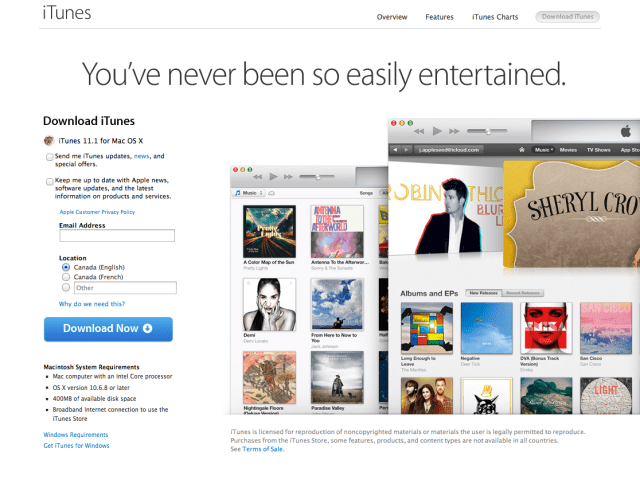
Apple has just released iTunes 11.1 for download featuring iTunes Radio, Genius Shuffle, Podcast Stations, and iOS 7 syncing support.
What's new in iTunes: This version of iTunes comes with several major new features, including:
● iTunes Radio. iTunes Radio is a great new way to discover music. Choose from over 250 stations or start a new one from your favorite artist or song. Enjoy iTunes Radio ad-free once you subscribe to iTunes Match.
● Genius Shuffle. Introducing a magical new way to experience your music library. Choose Genius Shuffle and iTunes instantly plays songs that go great together. Click it again to hear something new—enjoying your music has never been this easy.
● Podcast Stations. You can now create custom stations of your favorite podcasts that update automatically with new episodes. Your stations, subscriptions, and current play position sync over iCloud to the Podcasts app.
● Sync with iOS 7. You can now use iTunes to sync your favorite music, movies, and more to devices with iOS 7. In addition, iTunes now makes it even easier to quickly organize and sync apps to your iPhone, iPad, and iPod touch.
Note: If you are using OS X Mavericks, your book library can now be found in iBooks for Mac.
Apple news, rumors, tutorials, price drop alerts, in your inbox every evening, free.
Unsubscribe at any time.
Success!
You have been subscribed.
Add Comment
Would you like to be notified when someone replies or adds a new comment?
Yes (All Threads)
Yes (This Thread Only)
No
Notifications
Would you like to be notified when we post a new Apple news article or tutorial?
Yes
No
Comments (19)
Comments are closed for this article.
0
myusiic - September 18, 2013 at 5:00pm
Just got the ITunes 11.1 update
0
Corky - September 18, 2013 at 4:59pm
IOS 7 has been released!!!!!
0
PaladinLV - September 18, 2013 at 4:51pm
Correct version is now being downloaded on the West Coast as of about 15 minutes ago.
0
Knight Dragneel - September 18, 2013 at 4:37pm
Nothing on website and nothing in iTunes, all 11.0.5.
0
myusiic - September 18, 2013 at 4:48pm
Just try in a different browser...May be some cookies problems... I dint see it on Firefox which i regular use but opened it on Safari and i could see it....But still when downloaded it says File not recognized
0
Applefan - September 18, 2013 at 4:36pm
Can anyone help?? I have a MacBook Air 2013, and I am trying to download iTunes 11.1 but when I open the DMG file, it says, the following disk images couldn't be displayed (iTunes 11.1, reason not recognized)!! I tried downloading it again, and restarting, but it doesn't work!!! Please help!
0
Aarey - September 18, 2013 at 4:34pm
It is on apple website guys!!!
0
J - September 18, 2013 at 4:32pm
Can confirm downloading it in Incognito works!
0
Ty - September 18, 2013 at 4:26pm
go to www.itunes.com not itunes.ca
i downloaded it just fine 30 mins ago
0
Maverick - September 18, 2013 at 4:23pm
iTunes 11.1 Windows x64
https://secure-appldnld.apple.com/iTunes11/041-8598.20130918.Exe55/iTunes64Setup.exe
=)
0
Corky - September 18, 2013 at 4:19pm
This means iOS 7 is about to be released!!!!!!!!!!!!
0
Knight Dragneel - September 18, 2013 at 4:22pm
Well They Said 18/9 At 7:00PM For Time Zone +2
0
myusiic - September 18, 2013 at 4:18pm
The Link that is taking to the Itunes is also 11.0.5 not 11.1
0
Maverick - September 18, 2013 at 4:18pm
delete the cache .. or incognito window .. and try again .. it worked for me
0
myusiic - September 18, 2013 at 4:16pm
Checked for update on my mac and it doesnt still show up
0
Knight Dragneel - September 18, 2013 at 4:16pm
Apple Site Still 11.0.5 And No Updates Available
0
Lee - September 18, 2013 at 4:13pm
Mine says that there are no updates available. =(
0
will - September 18, 2013 at 4:25pm
How do i install itunes 11.1 if i have itunes beta 11.1? Anyone know? Thanks in advance.
0
bob53366 - September 18, 2013 at 4:30pm
Just download it and install it. It overwrites the beta.






![Apple-LG Home Accessories Could Offer Dynamic Island Proximity Controls [Leak]](/images/news/102711/102711/102711-160.jpg "Apple-LG Home Accessories Could Offer Dynamic Island Proximity Controls [Leak]")


![How To Force Restart iPhone [Video]](/images/tutorials/95012/95012/95012-160.jpg "How To Force Restart iPhone [Video]")
![How To Turn Off iPhone [Video]](/images/tutorials/94999/94999/94999-160.jpg "How To Turn Off iPhone [Video]")
![How To Back Up Your iPhone to an External Drive on Mac [Video]](/images/tutorials/72786/72786/72786-160.jpg "How To Back Up Your iPhone to an External Drive on Mac [Video]")





![Mac mini Drops to $779.99 for Prime Big Deal Days [Deal]](/images/news/102624/102624/102624-160.jpg "Mac mini Drops to $779.99 for Prime Big Deal Days [Deal]")