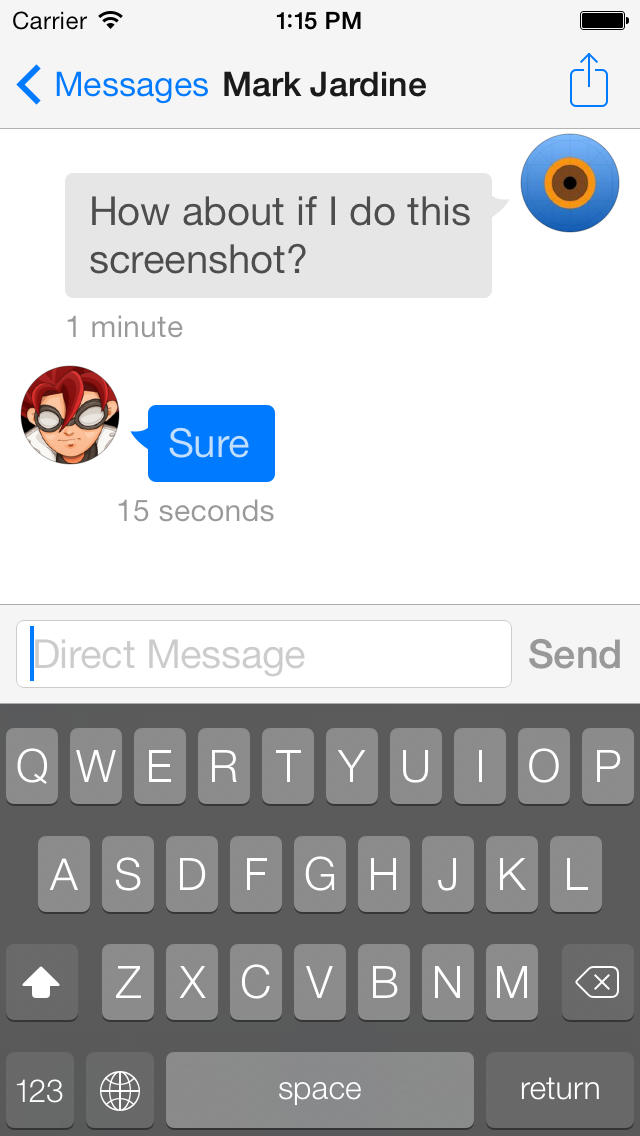
Tapbots has released an updated to Tweetbot 3 that brings the ability to use a list as your timeline, right swipe to quick reply, and resize text.
Tweetbot is a full-featured Twitter client that's fast, beautiful, and redesigned from the ground up for iOS7. Tweetbot has slimmed down to look and feel more like iOS7 and has also gained a lot of charm and speed in the process. Prepare to fall in love with your favorite Twitter client all over again.
Brief Highlights: ◆ Completely redesigned from the ground up for iOS7. ◆ Native Push Notifications. ◆ Mute filters lets you block messages from users without unfollowing them. Mute services, hashtags, people, and even keywords (regex included). ◆ Sync timeline position, direct message read statuses and mute filters between iPhone, iPad, and the Mac via iCloud or Tweetmarker. ◆ Customizable Navigation. The last 2 tabs are customizable and unused tabs are easily accessible. ◆ Support for multiple services like Pocket, Instapaper, Readability, CloudApp, Droplr, and more. ◆ Save drafts, add locations and POI's, attach photos/videos, manage your lists, and much more.
What's New In This Version: - Using a list as your timeline is back (hold down on "Timeline" title to reveal the menu) - Right swipe to quick reply (short swipe and release for custom action) - Resize text within the app (Settings > Display) - Option to set square avatars and hide timeline badges (Settings > Display) - Email conversations or share via Storify - "Last tweet x minutes ago" is back in the profiles (under recent images) - Removed "Retweeted by" string so there's less chance of truncation - Lots of bug fixes
You can purchase Tweetbot 3 from the App Store for $2.99.
Get the iClarified Daily Newsletter
Apple news, rumors, tutorials, price drop alerts, in your inbox every evening, free.
Unsubscribe at any time.
Success!
You have been subscribed.
Add Comment
Would you like to be notified when someone replies or adds a new comment?
Yes (All Threads)
Yes (This Thread Only)
No
Notifications
Would you like to be notified when we post a new Apple news article or tutorial?








![Apple-LG Home Accessories Could Offer Dynamic Island Proximity Controls [Leak]](/images/news/102711/102711/102711-160.jpg "Apple-LG Home Accessories Could Offer Dynamic Island Proximity Controls [Leak]")


![How To Force Restart iPhone [Video]](/images/tutorials/95012/95012/95012-160.jpg "How To Force Restart iPhone [Video]")
![How To Turn Off iPhone [Video]](/images/tutorials/94999/94999/94999-160.jpg "How To Turn Off iPhone [Video]")
![How To Back Up Your iPhone to an External Drive on Mac [Video]](/images/tutorials/72786/72786/72786-160.jpg "How To Back Up Your iPhone to an External Drive on Mac [Video]")





![Mac mini Drops to $779.99 for Prime Big Deal Days [Deal]](/images/news/102624/102624/102624-160.jpg "Mac mini Drops to $779.99 for Prime Big Deal Days [Deal]")