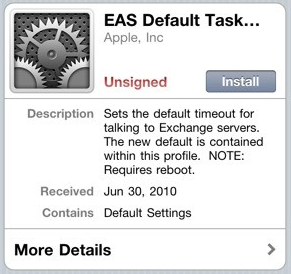
Apple has posted a configuration profile which aims to fix exchange problems noticed by customers updating to iOS 4
Symptoms Immediately after updating to iOS 4, some users may notice that Exchange ActiveSync Mail, Contacts, or Calendars do not sync, or sync very slowly. In addition, some Exchange Server administrators may notice their servers running slowly.
Resolution To work around this issue, users should install a configuration profile from Apple that increases the amount of time the iOS 4 device will wait for the Exchange Server to respond to its sync requests. For best results, the profile should be installed on as many iOS 4 devices at your company as possible.
Click this link from your iOS 4 device to install the profile.
Apple news, rumors, tutorials, price drop alerts, in your inbox every evening, free.
Unsubscribe at any time.
Success!
You have been subscribed.
Add Comment
Would you like to be notified when someone replies or adds a new comment?
Yes (All Threads)
Yes (This Thread Only)
No
Notifications
Would you like to be notified when we post a new Apple news article or tutorial?
Yes
No
Comments (5)
Comments are closed for this article.
0
Cory - July 5, 2010 at 11:56am
Hmm ... I get Cannot Install Profile. Safari could not install a profile due to an unknown error.
0
Ahmed - July 2, 2010 at 10:57am
Where is the Link????
0
DJ NAJ - July 2, 2010 at 6:48am
Where is the link?
0
Joe - July 1, 2010 at 11:10pm
There isn't a link there.
0
im.rich - July 1, 2010 at 6:45pm
You're a bit behind the curve here. As of yesterday morning, it was determined by users on the forums that the problem is directly related to the number of calendar entries a user has. The greater the number of entries (anything on your calendar older than 1/1/10 will probably put you over the "limit"), the better the chance you'll have the issue to some degree. The only real fix is to delete or archive your old calendar entries.





![Apple Releases iOS 26.4.1 and iPadOS 26.4.1 With Bug Fixes [Download]](/images/news/100492/100492/100492-160.jpg "Apple Releases iOS 26.4.1 and iPadOS 26.4.1 With Bug Fixes [Download]")

![Apple TV Debuts 'Criminal Record' Season 2 Trailer [Video]](/images/news/100488/100488/100488-160.jpg "Apple TV Debuts 'Criminal Record' Season 2 Trailer [Video]")






![13-inch MacBook Air M5 Drops to $949 in New All-Time Low [Deal]](/images/news/100466/100466/100466-160.jpg "13-inch MacBook Air M5 Drops to $949 in New All-Time Low [Deal]")




