iLock, an enhancement to your jailbroken iPhone, iPod Touch, or iPad that allows you to unlock your device in different ways has been updated with iOS 4 support. Using plugins, iLock lets you replace "slide to unlock" with other innovative methods (both secure and insecure).
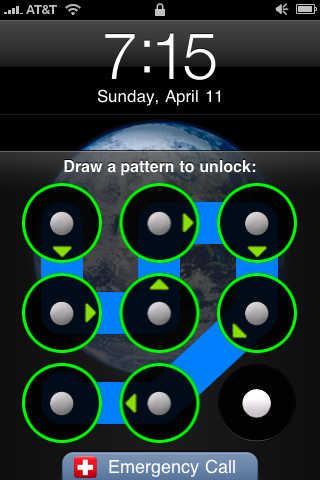
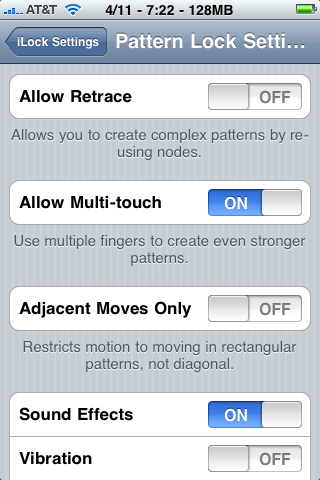
iLock comes with a default "Pattern Lock" plugin that enables you to draw a graphical pattern to unlock, similar to Android devices. Take advantage of iPhone OS-specific features, such as themes, multi-touch patterns, retrace patterns, multiple grid sizes, fun sound effects, and more!
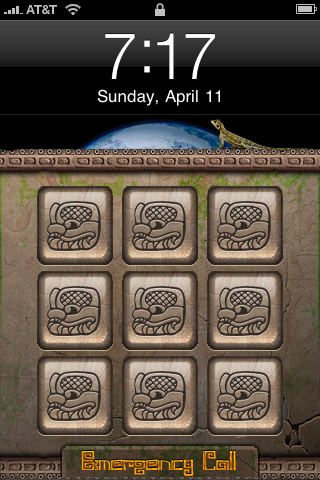
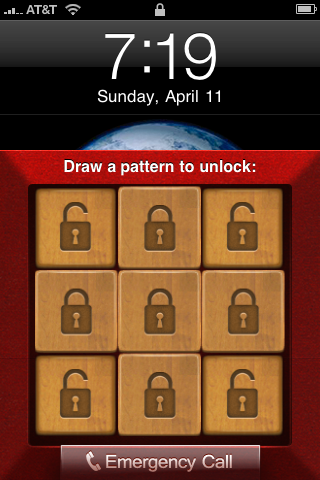
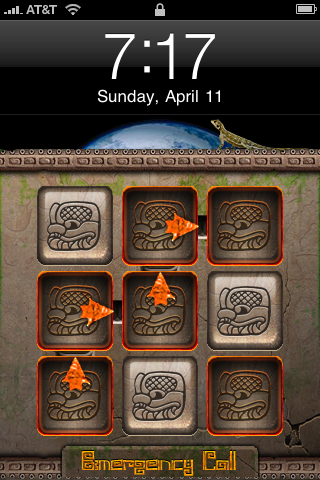
Features: ● Multi-plugin architecture with FREE open source plugin SDK (coming soon) - anyone can make a plugin ● All plugins made by SIC Mobile are theme-able with WinterBoard, even sounds ● Settings take effect immediately, no respring needed ● Compatible with 3rd-party lockscreen software such as Cydget and LockInfo ● Pattern Lock (default plugin) - emulates Android's pattern unlock system ● Pattern Lock plugin has iPhone OS specific features: multitouch, sounds, vibration, retrace, and up to 5x5 grids ● Pattern Lock plugin comes with 4 fun themes: iLock PL Maya, iLock PL Tiles, iLock PL Tech, and iLock PL Taller ● "Visibility" feature allows you to view your lockscreen better when 3rd-party lockscreen software is shown (such as LockInfo) ● Integrates with Passcode Lock (both PIN/numeric and alphanumeric types) ● Integrates with Emergency Call (iPhone devices only) ● Recovery password feature resets your unlock pattern / authentication method in case you forget it ● Fully international ready with 15 language translations coming soon ● Works on iPhone, iPhone 3G, iPhone 3GS, iPod Touch (2g - 3g), and iPad, on iOS versions 3.0 - 4.0.1 ● Look for upcoming iLock plugins by SIC Mobile in the near future, including BioLock (Biometric Face Recognition), VoiceprintUnlock, ComboLock and others
What's New In This Version: ● Fixed auto-activation issue with iOS 4 ● FEATURE: iOS 4 compatible (3.0+ still works great too) ● FEATURE: iPad support (BETA) ● FEATURE: German translation, thanks to Volker Kopetzky! ● FEATURE: Russian translation, thanks to Greg Larchev! ● FEATURE: PatternLock: Customizable delay for incorrect pattern ● FEATURE: PatternLock: New "iLock PL Taller" theme allows easier entry of patterns ● FEATURE: iLock Settings now available under main Settings app area as well as General Settings ● FEATURE: Recovery feature added to Settings app as well so you can reset your pattern if you forget it FEATURE: "Tap to appear" completely reworked into new Visibility options in Advanced Settings ● FEATURE: Visibility methods: Tap to Show, Slide to show, Always Show ● FEATURE: Tap to Hide (tap outside the plugin to hide iLock again) ● FEATURE: Change visibility prompt (for example "Tap to Show") from within iLock Settings ● FEATURE: iPad lock screen buttons (such as Slideshow) on Visibility UI ● BUG FIX: Vibration stops working after a while ● BUG FIX: Only allow vibration on devices which support it ● BUG FIX: LockInfo integration: When lock slider is hidden by LockInfo, you can still swipe to unlock, bypassing iLock ● BUG FIX: LockInfo integration: When iLock shows the original lock slider, LockInfo can interfere and leave the user with no way to unlock
You can purchase iLock from the Cydia Store for $1.99.
Get the iClarified Daily Newsletter
Apple news, rumors, tutorials, price drop alerts, in your inbox every evening, free.
Unsubscribe at any time.
Success!
You have been subscribed.
Add Comment
Would you like to be notified when someone replies or adds a new comment?
Yes (All Threads)
Yes (This Thread Only)
No
Notifications
Would you like to be notified when we post a new Apple news article or tutorial?
Yes
No
Comments (3)
Comments are closed for this article.
0
jack - January 26, 2011 at 9:10am
ilock thank
0
Klaus - August 9, 2010 at 6:45pm
works ok on 3GS but be warned not to install on iPad (current os).
it extremely slow down the processing of gestures, disables the bottom menus in cydia and rock (so that you can not search, deinstall, etc). It also compresses my infinidock icons to a small stack and switches my background to black.
After a while i managed to remove it via rock but after a reboot the problems continue :-/
thanks iLock !!!





![Apple Releases iOS 26.4.1 and iPadOS 26.4.1 With Bug Fixes [Download]](/images/news/100492/100492/100492-160.jpg "Apple Releases iOS 26.4.1 and iPadOS 26.4.1 With Bug Fixes [Download]")

![Apple TV Debuts 'Criminal Record' Season 2 Trailer [Video]](/images/news/100488/100488/100488-160.jpg "Apple TV Debuts 'Criminal Record' Season 2 Trailer [Video]")






![13-inch MacBook Air M5 Drops to $949 in New All-Time Low [Deal]](/images/news/100466/100466/100466-160.jpg "13-inch MacBook Air M5 Drops to $949 in New All-Time Low [Deal]")




