While many sites are reporting that you cannot create custom ringtones in iTunes 10 this is still in fact possible.
As we have published in our Windows and Mac ringtone tutorials, the general way to create a custom ringtone in iTunes was to modify the info of a track to start and stop at the desired point, create an AAC version of the song, drag this file to the desktop, rename it from .m4a to .m4r and add it back to iTunes.
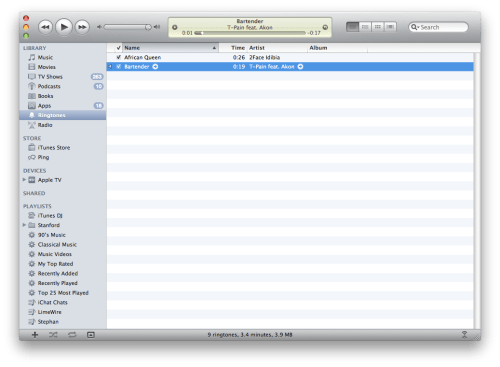
Unfortunately, it initially seems that Apple is no longer letting you do this as the .m4r file will not add back to your iTunes library. Turns out that you need to add the file back from within your iTunes Music folder.
There are two easy ways of doing this. First you can drag the .m4r file from the desktop to your iTunes Music/Ringtones folder then double click it. Another way of doing this is once you have created the AAC version, right click it and select Show in Finder. Then delete the file in iTunes choosing to remove it from the library but Keep File. Rename the .m4a file you located in Finder to .m4r, then double click it to add it as a ringtone.
We will be updating our tutorials shortly.
Get the iClarified Daily Newsletter
Apple news, rumors, tutorials, price drop alerts, in your inbox every evening, free.
Unsubscribe at any time.
Success!
You have been subscribed.
Add Comment
Would you like to be notified when someone replies or adds a new comment?
Yes (All Threads)
Yes (This Thread Only)
No
Notifications
Would you like to be notified when we post a new Apple news article or tutorial?
Yes
No
Comments (6)
Comments are closed for this article.
0
enb14 - September 8, 2010 at 8:11am
Very helpful -- thanks
0
Catriona - September 5, 2010 at 6:54pm
thank you for uploading this i recently got an iphone 4 on the day itunes 10 was released and was devastated when i couldnt customise my ringtones without buying them. im so much more happy with the phone now that i can fully customise it thenks!!
0
Kevin - September 4, 2010 at 4:44am
Ok, I see you point, but this isn't really "creating ringtones IN iTunes." This is "hacking a ringtone together USING iTunes."
0
namank - September 3, 2010 at 4:36am
oh WOW !! thats so cooool !
but i guess i did this in 1991 ! haa
0
nickle1 - September 3, 2010 at 6:02am
you can make you ring tones with garage band and export it to itunes





![Apple Releases iOS 26.4.1 and iPadOS 26.4.1 With Bug Fixes [Download]](/images/news/100492/100492/100492-160.jpg "Apple Releases iOS 26.4.1 and iPadOS 26.4.1 With Bug Fixes [Download]")

![Apple TV Debuts 'Criminal Record' Season 2 Trailer [Video]](/images/news/100488/100488/100488-160.jpg "Apple TV Debuts 'Criminal Record' Season 2 Trailer [Video]")






![13-inch MacBook Air M5 Drops to $949 in New All-Time Low [Deal]](/images/news/100466/100466/100466-160.jpg "13-inch MacBook Air M5 Drops to $949 in New All-Time Low [Deal]")




