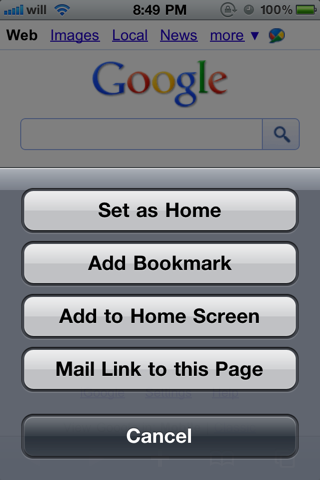
Will Strafach has released a new tweak that lets you set your iPad, iPhone, or iPod homepage in MobileSafari.
Allows you to set a home page in Mobile Safari by simply tapping the "+" button while visiting the website of your choice, then tapping "Set as Home
There are no homescreen icons or settings for this add-on.
You can download the tweak from the Cydia Store for $.99.
Get the iClarified Daily Newsletter
Apple news, rumors, tutorials, price drop alerts, in your inbox every evening, free.
Unsubscribe at any time.
Success!
You have been subscribed.
Add Comment
Would you like to be notified when someone replies or adds a new comment?
Yes (All Threads)
Yes (This Thread Only)
No
Notifications
Would you like to be notified when we post a new Apple news article or tutorial?
Yes
No
Comments (6)
Comments are closed for this article.
0
vkaif - September 9, 2010 at 8:06pm
If anyone could do Add Attachment to Email hack. it would be really cool and useful but this is still very nice hack
0
Lomisz - September 9, 2010 at 7:35pm
Just get Perfect Browser which is 100 times better than safari with many more settings.
0
Urgaec - September 9, 2010 at 6:19pm
Same here. No home button or don't even know where it saves it. May be some one can explain.
0
Alpha4 - September 9, 2010 at 6:15pm
Purchased but doesn't work for me. Can someone explain how this is supposed to work please?
Set homepage for Google.com, Navigated to yahoo.com, found no HOME button to return to homepage.
OK, so closed iPhone Safari thinking that when I reopened it would display homepage.... Nope. it still displays last page visited(in this case yahoo.com)
As far as I can see this App does nothing except adds a 'Set As Homepage' button on Safari '+' button menu.
Am I right?
0
tvo - September 9, 2010 at 6:19pm
Yes, you are right. This app does nothing except adding the "Set as homepage" button. The app is useless even it's free. Unlike Safari Downloader, which adds a control button in Safari.
0
Cameron - September 9, 2010 at 6:30pm
I can't find the hack name in this article or in Cydia to try it. What am I missing?





![Apple Releases iOS 26.4.1 and iPadOS 26.4.1 With Bug Fixes [Download]](/images/news/100492/100492/100492-160.jpg "Apple Releases iOS 26.4.1 and iPadOS 26.4.1 With Bug Fixes [Download]")

![Apple TV Debuts 'Criminal Record' Season 2 Trailer [Video]](/images/news/100488/100488/100488-160.jpg "Apple TV Debuts 'Criminal Record' Season 2 Trailer [Video]")






![13-inch MacBook Air M5 Drops to $949 in New All-Time Low [Deal]](/images/news/100466/100466/100466-160.jpg "13-inch MacBook Air M5 Drops to $949 in New All-Time Low [Deal]")




