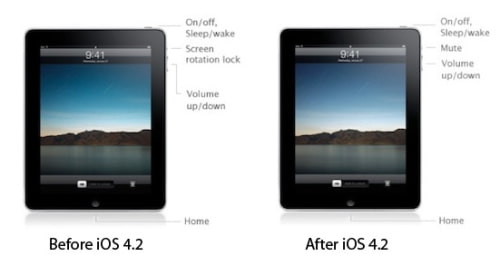
iOS 4.2 for iPad changes the switch on the side from a screen orientation lock to a mute switch. A 9to5Mac reader, Robert, contacted Steve Jobs asking if the change was permanent.
----- In IOS 4.2 for iPad is the switch on the side going to be the mute and not screen orientation lock from now on? -----
Yep.
Sent from my iPhone
-----
Robert replied asking Jobs if there was any chance this would be user customizable.
----- Are you planning to make that a changeable option? -----
Apple news, rumors, tutorials, price drop alerts, in your inbox every evening, free.
Unsubscribe at any time.
Success!
You have been subscribed.
Add Comment
Would you like to be notified when someone replies or adds a new comment?
Yes (All Threads)
Yes (This Thread Only)
No
Notifications
Would you like to be notified when we post a new Apple news article or tutorial?
Yes
No
Comments (13)
Comments are closed for this article.
0
chris - October 25, 2010 at 8:49am
Not cool. I don't want mute, I can lower volume. It is not cool that it is not customizable.
0
Avi Alkalay - October 24, 2010 at 5:10am
I never use the switch to lock my iPad's screen. I actually find it more useful for muting.
0
HY - October 24, 2010 at 1:15pm
I use the screen lock all time for my 18 month old who loves playing with the iPad, this is going to suck
0
t11chb - October 24, 2010 at 5:42pm
They should give you the choice, just like how you have the choice for the home button for iPod etc
0
Aaron Wright - October 24, 2010 at 3:08am
I agree with josh. But that is whee jailbreak developers come in and fix that.
0
Tony - October 23, 2010 at 10:39pm
Then where is the screen lock function??
It must be somewhere, it would be stupid not to have one.
0
Gecko - October 23, 2010 at 10:47pm
It will be in the multitasking bar like on the iPhone. When you double click the home button to reveal the multitasking bar, and swipe left, you will see iPod controls and a button to lock the screen orientation
0
yoshac - October 23, 2010 at 10:47pm
As with all iOS 4.x, double-click the home button and the rotation lock is on the left end of the bottom icon bar.
0
john - October 23, 2010 at 11:59pm
maybe someone will come up with a cydia app that would make it configurable
0
josh - October 24, 2010 at 2:25am
it'll probably be in the multitask pane like in iOS 4.0 :)
0
Adrian Mihalko - October 24, 2010 at 4:12am
It is in the multitask menu.
0
Ian - October 24, 2010 at 6:03pm
it will be like on the iphone...Double click the home button, swipe dock to the right and there will be the screen rotation lock/unlock icon.
Great idea for iPhone Really bad idea for the iPad
0
Robert - October 25, 2010 at 8:22am
Double click the home button and slide the multitask
Row all the way to the right and you will find it
Just like the iPhone lock as the first icon





![Apple Releases iOS 26.4.1 and iPadOS 26.4.1 With Bug Fixes [Download]](/images/news/100492/100492/100492-160.jpg "Apple Releases iOS 26.4.1 and iPadOS 26.4.1 With Bug Fixes [Download]")

![Apple TV Debuts 'Criminal Record' Season 2 Trailer [Video]](/images/news/100488/100488/100488-160.jpg "Apple TV Debuts 'Criminal Record' Season 2 Trailer [Video]")






![13-inch MacBook Air M5 Drops to $949 in New All-Time Low [Deal]](/images/news/100466/100466/100466-160.jpg "13-inch MacBook Air M5 Drops to $949 in New All-Time Low [Deal]")




