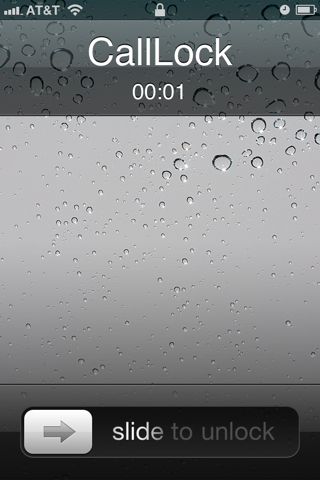
CallLock has been updated with a proximity mode that locks your iPhone screen when you put it up against your ear. For many with annoying proximity sensor problems this will prevent you from accidentally touching the screen with your cheek.
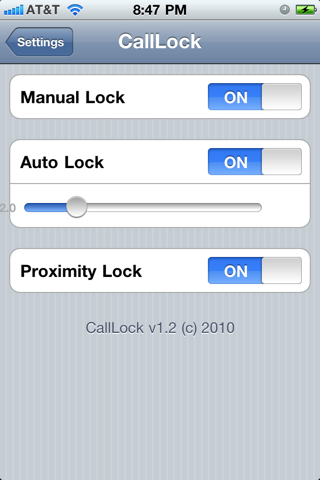
MANUAL MODE: CallLock will override the default action of the Power button during a call to lock the screen instead of the normal end call action.
AUTOMATIC MODE: CallLock will automatically lock your screen as soon as a incoming or outgoing call is connected. You can adjust the delay yourself.
PROXIMITY MODE: CallLock will lock your screen as soon as you put the iPhone up to your ear.
CallLock is enabled in manual mode by default. To enable CallLock automatically or by proximity you must turn on the feature from inside your Settings app. No new icons will be added to your home screen.
*You do not need automatic mode enabled for proximity mode to work.
You can download CallLock from the Cydia Store for $0.99.
Get the iClarified Daily Newsletter
Apple news, rumors, tutorials, price drop alerts, in your inbox every evening, free.
Unsubscribe at any time.
Success!
You have been subscribed.
Add Comment
Would you like to be notified when someone replies or adds a new comment?
Yes (All Threads)
Yes (This Thread Only)
No
Notifications
Would you like to be notified when we post a new Apple news article or tutorial?
Yes
No
Comments (3)
Comments are closed for this article.
0
Sajd04 - December 17, 2010 at 9:39am
Apple should make some important applications like deleting calls one by one and all as it does not iphone.
0
Zebu - December 7, 2010 at 5:13pm
Now we just need a quick way to hang up the call when done...
Maybe change the power Burton back to end Call....





![Apple Releases iOS 26.4.1 and iPadOS 26.4.1 With Bug Fixes [Download]](/images/news/100492/100492/100492-160.jpg "Apple Releases iOS 26.4.1 and iPadOS 26.4.1 With Bug Fixes [Download]")

![Apple TV Debuts 'Criminal Record' Season 2 Trailer [Video]](/images/news/100488/100488/100488-160.jpg "Apple TV Debuts 'Criminal Record' Season 2 Trailer [Video]")






![13-inch MacBook Air M5 Drops to $949 in New All-Time Low [Deal]](/images/news/100466/100466/100466-160.jpg "13-inch MacBook Air M5 Drops to $949 in New All-Time Low [Deal]")




