

Mail Rules Lets You Apply Rules to Your Incoming iOS Mail
Posted December 18, 2010 at 10:24pm by
Shalom Levytam
Mail Rules is a new Cydia tweak that finally lets you set rules for your incoming iPhone and iPad mail.
The tweak is accessed via the "Rules..." page in Mail, Contacts, Calendars settings. No new icons are added to your home screen
Supports matching on the following criteria:
- Account
- Headers
- Recipient
- Sender
- Subject
And supports the following actions:
- Delete message
- Mark as read
- Mark as unread
- Copy to folder
- Move to folder
- Stop processing rules
You can purchase the tweak for $1.99 from the Cydia Store.
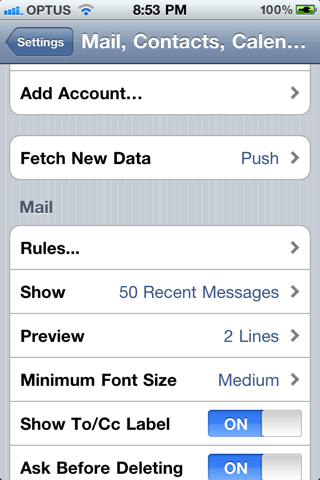

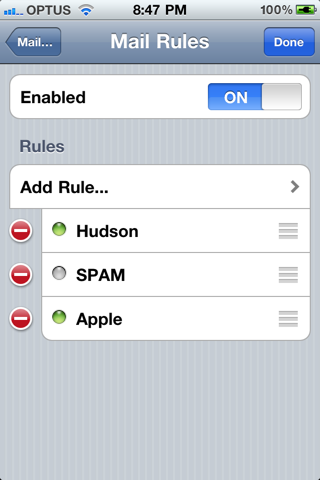
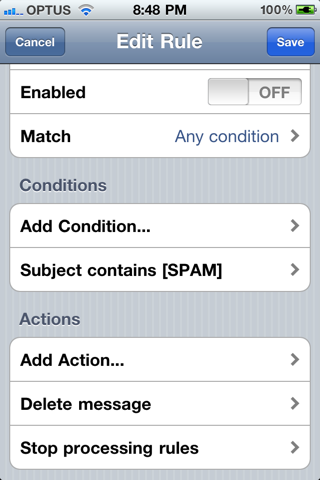
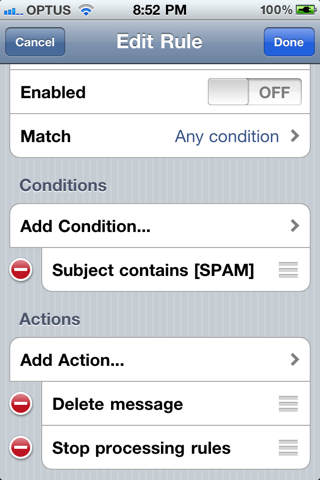
The tweak is accessed via the "Rules..." page in Mail, Contacts, Calendars settings. No new icons are added to your home screen
Supports matching on the following criteria:
- Account
- Headers
- Recipient
- Sender
- Subject
And supports the following actions:
- Delete message
- Mark as read
- Mark as unread
- Copy to folder
- Move to folder
- Stop processing rules
You can purchase the tweak for $1.99 from the Cydia Store.


![Apple Releases iOS 26.4.1 and iPadOS 26.4.1 With Bug Fixes [Download]](/images/news/100492/100492/100492-160.jpg "Apple Releases iOS 26.4.1 and iPadOS 26.4.1 With Bug Fixes [Download]")

![Apple TV Debuts 'Criminal Record' Season 2 Trailer [Video]](/images/news/100488/100488/100488-160.jpg "Apple TV Debuts 'Criminal Record' Season 2 Trailer [Video]")






![13-inch MacBook Air M5 Drops to $949 in New All-Time Low [Deal]](/images/news/100466/100466/100466-160.jpg "13-inch MacBook Air M5 Drops to $949 in New All-Time Low [Deal]")




