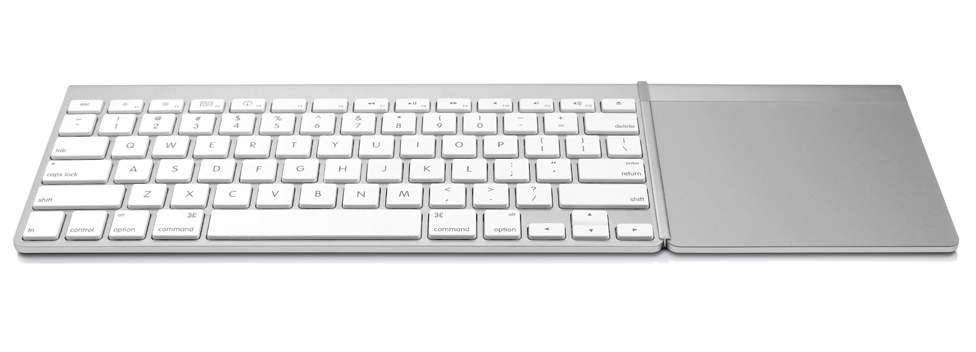
MagicWand is an accessory from TwelveSouth that connects Apple's Magic Trackpad to your Apple Wireless Keyboard, creating the sleek, one-piece input device.
Gestures. The future of the keyboard. Multi-touch gestures are a big part of the charm of iPad and key to the future of Mac desktops. MagicWand helps you make the most of that finger tapping, swiping technology by partnering your keyboard with the trackpad. Everyday tasks like editing and renaming family pictures in iPhoto no longer require a reach across the desk. With MagicWand, the only thing to pick up and position while using a Mac are your hands.
A Zen-like workspace, just like that. If you like a clean, tidy work environment, MagicWand is a must-have. It’s a snap (literally) to set up, and you can position the trackpad on either side of your keyboard (lefty’s rejoice). You will now have the ultimate keyboard before you, one that lets you type, click, scroll and swipe.
Mac home theater mission control. Use your Mac to browse the web and stream videos and movies from sites like Hulu and YouTube? Imagine doing all that with a one-piece keyboard and trackpad in your hands. With MagicWand you can. A nifty H-beam keeps the keyboard in-line with the trackpad so you can use your MagicWand kit on any surface, including your lap or the armrest on the recliner. Your new keyboard is free to roam.
Photoshop - two hands at a time. When you set up your MagicWand, you can position the trackpad opposite your mousing hand - and use the mouse and trackpad at the same time. Swipe, pinch, and gesture on the trackpad. Use the mouse for more precise actions like drawing and painting. It’s the best of both worlds.
You can purchase the accessory for $29.99 with free shipping for a limited time.
Get the iClarified Daily Newsletter
Apple news, rumors, tutorials, price drop alerts, in your inbox every evening, free.
Unsubscribe at any time.
Success!
You have been subscribed.
Add Comment
Would you like to be notified when someone replies or adds a new comment?
Yes (All Threads)
Yes (This Thread Only)
No
Notifications
Would you like to be notified when we post a new Apple news article or tutorial?




![Apple Releases iOS 26.4.1 and iPadOS 26.4.1 With Bug Fixes [Download]](/images/news/100492/100492/100492-160.jpg "Apple Releases iOS 26.4.1 and iPadOS 26.4.1 With Bug Fixes [Download]")

![Apple TV Debuts 'Criminal Record' Season 2 Trailer [Video]](/images/news/100488/100488/100488-160.jpg "Apple TV Debuts 'Criminal Record' Season 2 Trailer [Video]")






![13-inch MacBook Air M5 Drops to $949 in New All-Time Low [Deal]](/images/news/100466/100466/100466-160.jpg "13-inch MacBook Air M5 Drops to $949 in New All-Time Low [Deal]")




