The official DIRECTV app for the iPad is now available in the App Store.
DIRECTV’s new iPad app. Now your favorite shows, movies and sports are just a tap away.
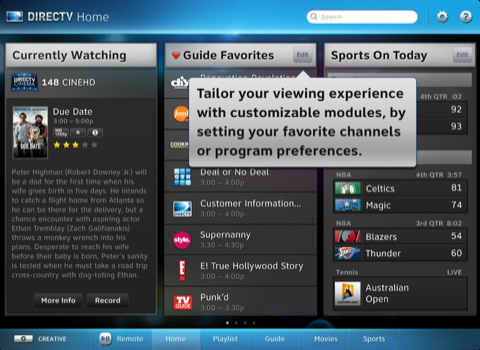
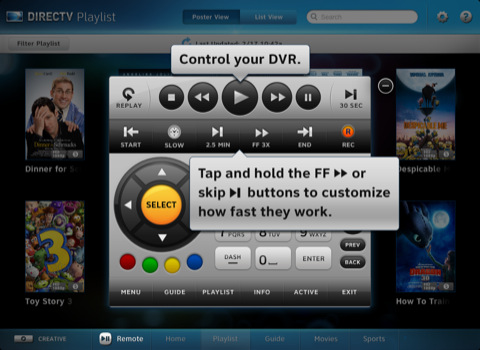
FEATURES ● Highly customizable remote control functionality right on your iPad. ● Browse and discover movies, shows and sports - without interrupting the show you are currently watching on TV. ● Set recordings or channel tune instantly, and access more information on shows, cast & crew, with parental ratings. ● Access sports scores and schedules and set your favorite teams.
HOME SCREEN (Customizable modules) ● Currently Watching – More information about the show you are watching now and suggestions for similar shows. ● Guide Favorites – List of favorite channels selected through the Guide. ● Channel Guide – Displays up to 14 days of upcoming shows for a selected channel. ● Favorite Channels – Create user preferred lists of channels (by category, his or her list, etc.) ● QuickTune – One-touch selection of your favorite channels by name or icon. ● News Channels – All the news channels in one module. ● Kids & Family – All the kids & family friendly channels in one module. ● Sports – Browse available sports events and scores by game or favorite teams.
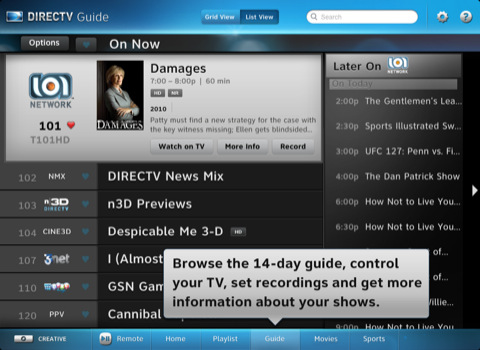
DEDICATED TABS (Playlist, Guide, Movies and Sports) ● Organize and view all of your recorded content by poster or list view. ● View list of recorded content for each receiver. ● Search listings up to 14 days in advance by traditional grid view or selected channel. ● View show descriptions, Cast & Crew, Photos, Suggestions & Parental Information. ● Change channels, set recordings and get more information. ● Customize the guide by favorite channels. ● View current sports matchups and scores by league, with the option to watch or record.
Requirements ● Recording and remote control functionality is available to DIRECTV customers only. ● DIRECTV customers must have a residential home account registered on directv.com http://directv.com to access recording & remote functionality. ● Recording requires a Wi-Fi, Edge or 3G network connection to schedule. Remote control requires a Wi-Fi connection to your home network. ● In rare instances, scheduled recording(s) may not be recognized. ● Available for customers in the USA only. ● Remote scheduling requires DIRECTV PLUS DVR (models R15, R16, R22), DIRECTV PLUS HD DVR (models HR20, HR21, HR22, HR23, HR24) or TiVo® Series 2 receivers with 6.4a software. Receivers do not require phone or broadband connection to schedule a recording. ● Remote control requires DIRECTV PLUS HD DVR (models HR20, HR21, HR22, HR23, HR24 and H21, H23, H24) connected to a broadband connection.
You can download DIRECTV App for iPad from the App Store for free.
Apple news, rumors, tutorials, price drop alerts, in your inbox every evening, free.
Unsubscribe at any time.
Success!
You have been subscribed.
Add Comment
Would you like to be notified when someone replies or adds a new comment?
Yes (All Threads)
Yes (This Thread Only)
No
Notifications
Would you like to be notified when we post a new Apple news article or tutorial?
Yes
No
Comments (3)
Comments are closed for this article.
0
Damon - September 23, 2011 at 2:16am
I like that DirecTV updated their iPad app. I use a similar app, but through my employer DISH Network. I have the DISH Remote Access app and I prefer to use it over any other. Like the DirecTV app, it lets me control my DVR using my iPad, and I can set recordings as well. Where the DISH Remote Access app is different is I can watch my channels on my iPad! I don't mean the On Demand things that have a limited selection; I can watch live TV or see my recordings just as I would see it on my TV. Best of all, I can take it anywhere I want and still be able to watch TV. So even though it is cool that DirecTV has more features on their app, I would much prefer the DISH Remote Access app!
0
MTS - February 28, 2011 at 1:28pm
Best thing I did was get rid of DirecTv!
0
anonmuz - February 28, 2011 at 6:01pm
Sad day when Dish's app is still better than DTV's and DTV has nothing but time to catch up or make a better app.





![Apple Releases iOS 26.4.1 and iPadOS 26.4.1 With Bug Fixes [Download]](/images/news/100492/100492/100492-160.jpg "Apple Releases iOS 26.4.1 and iPadOS 26.4.1 With Bug Fixes [Download]")

![Apple TV Debuts 'Criminal Record' Season 2 Trailer [Video]](/images/news/100488/100488/100488-160.jpg "Apple TV Debuts 'Criminal Record' Season 2 Trailer [Video]")






![13-inch MacBook Air M5 Drops to $949 in New All-Time Low [Deal]](/images/news/100466/100466/100466-160.jpg "13-inch MacBook Air M5 Drops to $949 in New All-Time Low [Deal]")




