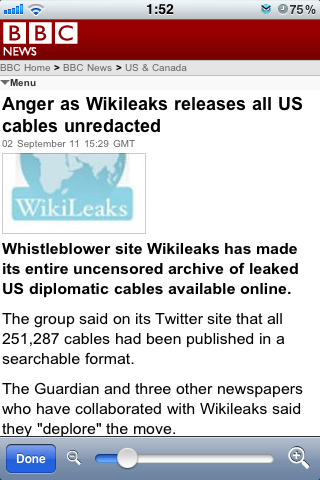
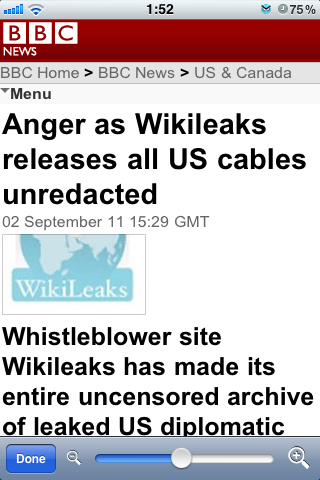
Magnifier for Safari is a tweak for the iPhone and iPod touch that lets you adjust the font size in MobileSafari.
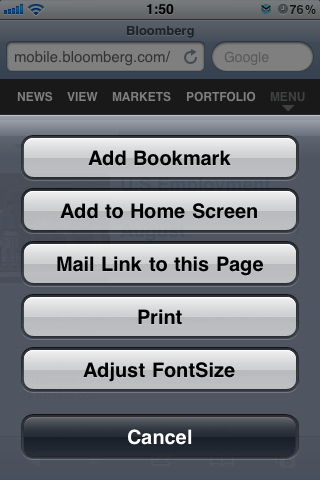
Once installed, there will be an "Adjust FontSize" button along with "Add Bookmark", "Add to Home Screen" etc. You can change font size with slider bar on the bottom of screen.
Note: There are some web pages that have FIXED layout. This tweak cannot change font size on those pages.
You can purchase the tweak for $0.99 on the Cydia Store.
Apple news, rumors, tutorials, price drop alerts, in your inbox every evening, free.
Unsubscribe at any time.
Success!
You have been subscribed.
Add Comment
Would you like to be notified when someone replies or adds a new comment?
Yes (All Threads)
Yes (This Thread Only)
No
Notifications
Would you like to be notified when we post a new Apple news article or tutorial?
Yes
No
Comments (2)
Comments are closed for this article.
0
JRichVA - September 8, 2011 at 4:42pm
Good. Now maybe you can actually read iClarified on my iPhone 4. I can read on my 3G no problem but way too small on the 4. U have pinch to zoom and then scroll sideways. Very annoying. Why isn't this site optimized for mobile devices like pretty much every other news/info site. Look forward to trying this tweak.
0
JRichVA - September 8, 2011 at 4:45pm
Actually just read that sone sites won't work...and I bet this is one of them. And it's a dollar. So much for that. Will go back to zooming or holding phone sideways to read iClarified.





![Apple Releases iOS 26.4.1 and iPadOS 26.4.1 With Bug Fixes [Download]](/images/news/100492/100492/100492-160.jpg "Apple Releases iOS 26.4.1 and iPadOS 26.4.1 With Bug Fixes [Download]")

![Apple TV Debuts 'Criminal Record' Season 2 Trailer [Video]](/images/news/100488/100488/100488-160.jpg "Apple TV Debuts 'Criminal Record' Season 2 Trailer [Video]")






![13-inch MacBook Air M5 Drops to $949 in New All-Time Low [Deal]](/images/news/100466/100466/100466-160.jpg "13-inch MacBook Air M5 Drops to $949 in New All-Time Low [Deal]")




