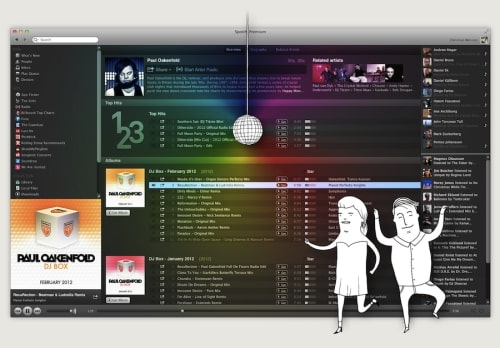
Spotify has announced that its desktop applications for Mac and Windows have been updated with gapless playback and crossfade.
Gapless playback lets the tracks flow seamlessly, one to the next, without any silence between. Perfect for classical music, live recordings and concept albums. It's such a useful feature that the new release of Spotify will have gapless 'On' by default. If you want to turn it off, it'll be right there in your Spotify Preferences.
Another much-requested feature is crossfade – fading out one song as you bring another in. Now you can DJ to your heart's content! We've left this one for you to flip the switch yourself – go to your Spotify Preferences to turn it on.
What's New in This Release: ● Gapless playback ('on' by default) ● Crossfade support ('on' via Preferences) ● Faster artist browsing ● New save and restore feature for 'Now Playing' ● Improved Subscribe, Buddy List and Favourites options ● Drag & drop fixed on Windows ● 'Hide purchase buttons' option (Premium-users only) ● 'Offline Mode' via Spotify menu
The new release starts rolling out today. You can download a preview version from here: Mac, Windows.
Get the iClarified Daily Newsletter
Apple news, rumors, tutorials, price drop alerts, in your inbox every evening, free.
Unsubscribe at any time.
Success!
You have been subscribed.
Add Comment
Would you like to be notified when someone replies or adds a new comment?
Yes (All Threads)
Yes (This Thread Only)
No
Notifications
Would you like to be notified when we post a new Apple news article or tutorial?




![Apple Releases iOS 26.4.1 and iPadOS 26.4.1 With Bug Fixes [Download]](/images/news/100492/100492/100492-160.jpg "Apple Releases iOS 26.4.1 and iPadOS 26.4.1 With Bug Fixes [Download]")

![Apple TV Debuts 'Criminal Record' Season 2 Trailer [Video]](/images/news/100488/100488/100488-160.jpg "Apple TV Debuts 'Criminal Record' Season 2 Trailer [Video]")






![13-inch MacBook Air M5 Drops to $949 in New All-Time Low [Deal]](/images/news/100466/100466/100466-160.jpg "13-inch MacBook Air M5 Drops to $949 in New All-Time Low [Deal]")




