The DIRECTV App for iPad has been updated to go 'anywhere you go', letting you watch shows and movies over 3G or 4G.
The ultimate video experience is just a tap away with the FREE DIRECTV App for iPad. Turn your iPad into a portable TV and watch in any room of your home. And now DIRECTV goes anywhere you go. You can customize and control your entertainment, and watch shows and movies you get at home anywhere, right on your iPad. It's all at your fingertips.
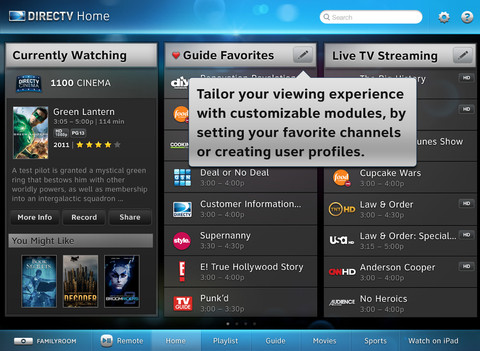
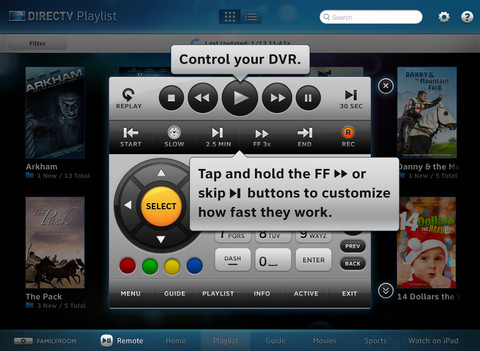
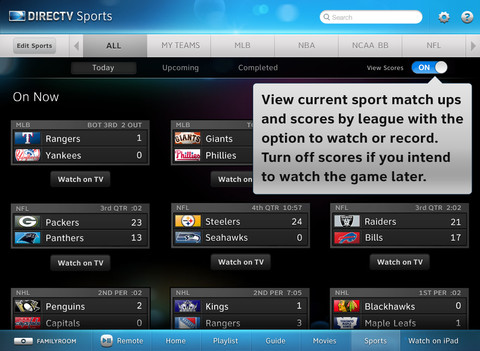
FEATURES: - Watch shows and movies from HBO, Starz, Encore, Cinemax and more on your iPad anywhere you go. - Turn your iPad into a portable TV and watch your favorite channels in any room of your home. - Browse and discover shows, movies and sports. Plus get program descriptions, cast & crew info, and parental ratings – without interrupting what you are currently watching on TV. - Tap to tune in to any show on your TV from your iPad. - Set your DVR to record your favorite shows from anywhere. - Track your favorite teams and get real-time scores and schedules.
REQUIREMENTS - DIRECTV customers must have a residential home account registered on DIRECTV's website to access the DIRECTV app for iPad. - Watching On Demand content requires an active Wi-Fi or 3G Internet connection. For best performance, connect to a strong Wi-Fi signal. - Live TV Streaming and remote control requires a Wi-Fi connection to your home network and a DIRECTV Plus HD DVR (models R22, and HR20 or higher) connected to a broadband Internet connection. Remote control also works with HD receivers (models H21, H23 or higher) connected to a broadband Internet connection. - Available content is based on your current programming package and premium service. Not all content is available to stream at this time. - Scheduling a recording requires a Wi-Fi, Edge or 3G network connection and a DIRECTV Plus DVR (models R15, R16, and R22), DIRECTV Plus HD DVR (models HR20 or higher) or TiVo Series 2 receivers with 6.4a software. Receivers do not require phone or broadband Internet connection to schedule a recording. - Tips, Tricks and Customer Support are available on the DIRECTV website.
What's New In This Version: - Now DIRECTV goes anywhere you go. Watch shows and movies you get at home anywhere, on your iPad. - View programs recently watched on the iPad and resume where you left off. - Discover the top shows and movies that people are currently watching and talking about with the new social module. - Check in to Miso on the shows you are currently watching.
You can download DIRECTV App for iPad from the App Store for free.
Apple news, rumors, tutorials, price drop alerts, in your inbox every evening, free.
Unsubscribe at any time.
Success!
You have been subscribed.
Add Comment
Would you like to be notified when someone replies or adds a new comment?
Yes (All Threads)
Yes (This Thread Only)
No
Notifications
Would you like to be notified when we post a new Apple news article or tutorial?
Yes
No
Comments (5)
Comments are closed for this article.
0
Guest - March 22, 2012 at 1:29am
If you have a jailbroken iPad 2 this update will not work.. my iPad 2 was working perfectly like an idiot I just updated it. Now it stopped working.. The xCon was working on version 1.3.9. Can anyone patch this please? I should never have updated it..
0
Guest - March 22, 2012 at 5:03am
I reinstalled the previous version 1.3.9 back from my iTunes. Skip this version.. This update wouldn't work with current app. Please update the patch for this new version. Thanks.
0
BustAGroove - March 22, 2012 at 12:06am
Any chance of porting to iPhone 4 or higher?
0
Andrew - March 21, 2012 at 8:09pm
Why not iPhone like hbo 2 go..!?
0
Paul - March 21, 2012 at 7:55pm
Hahahahah! I can see someone using up their 2-5GB data in a few hours.





![Apple Releases iOS 26.4.1 and iPadOS 26.4.1 With Bug Fixes [Download]](/images/news/100492/100492/100492-160.jpg "Apple Releases iOS 26.4.1 and iPadOS 26.4.1 With Bug Fixes [Download]")

![Apple TV Debuts 'Criminal Record' Season 2 Trailer [Video]](/images/news/100488/100488/100488-160.jpg "Apple TV Debuts 'Criminal Record' Season 2 Trailer [Video]")






![13-inch MacBook Air M5 Drops to $949 in New All-Time Low [Deal]](/images/news/100466/100466/100466-160.jpg "13-inch MacBook Air M5 Drops to $949 in New All-Time Low [Deal]")




