

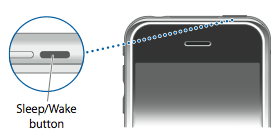
To power off your iPhone (Sometimes called a soft reset) follow these instructions:
Step One
Hold down the Sleep/Wake button for 3 seconds.
Step Two
A Power Slider will appear on the screen. Move this slider to the left to power off your iPhone.

Step Three
Press the Sleep/Wake button again to power back on your iPhone.
Step One
Hold down the Sleep/Wake button for 3 seconds.
Step Two
A Power Slider will appear on the screen. Move this slider to the left to power off your iPhone.
Step Three
Press the Sleep/Wake button again to power back on your iPhone.


![Apple Releases iOS 26.4.1 and iPadOS 26.4.1 With Bug Fixes [Download]](/images/news/100492/100492/100492-160.jpg "Apple Releases iOS 26.4.1 and iPadOS 26.4.1 With Bug Fixes [Download]")

![Apple TV Debuts 'Criminal Record' Season 2 Trailer [Video]](/images/news/100488/100488/100488-160.jpg "Apple TV Debuts 'Criminal Record' Season 2 Trailer [Video]")






![13-inch MacBook Air M5 Drops to $949 in New All-Time Low [Deal]](/images/news/100466/100466/100466-160.jpg "13-inch MacBook Air M5 Drops to $949 in New All-Time Low [Deal]")




