Hotmail customers in the US, Canada, and Brazil can now add other e-mail accounts to Hotmail.
you can see any POP-enabled e-mail account (including Yahoo! Mail (Plus), AOL Mail, and Gmail) right from your Hotmail account. You can put all of your messages together in your inbox or each e-mail account in its own folder, your choice.
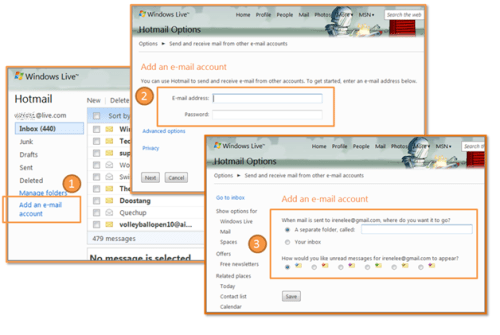
You can set this up in Hotmail in three simple steps:
(1) Click Add an e-mail account on the left-hand side of the Hotmail inbox. (2) Type the e-mail address and password for your other account, and click Next. (3) Choose where you want the messages to go, and click Save.
Apple news, rumors, tutorials, price drop alerts, in your inbox every evening, free.
Unsubscribe at any time.
Success!
You have been subscribed.
Add Comment
Would you like to be notified when someone replies or adds a new comment?
Yes (All Threads)
Yes (This Thread Only)
No
Notifications
Would you like to be notified when we post a new Apple news article or tutorial?
Yes
No
Comments (3)
Comments are closed for this article.
0
Rajiv - July 1, 2009 at 1:31pm
IMAP please!
0
Jay - July 1, 2009 at 8:59am
I didn't even know hotmail was still around.
0
Naz - July 1, 2009 at 12:05pm
I was wondering the same thing LOL
I know most people, including me, uses it for MSN Messenger only. They still use POP3 email client access using mail program!!





![Apple Releases iOS 26.4.1 and iPadOS 26.4.1 With Bug Fixes [Download]](/images/news/100492/100492/100492-160.jpg "Apple Releases iOS 26.4.1 and iPadOS 26.4.1 With Bug Fixes [Download]")

![Apple TV Debuts 'Criminal Record' Season 2 Trailer [Video]](/images/news/100488/100488/100488-160.jpg "Apple TV Debuts 'Criminal Record' Season 2 Trailer [Video]")






![13-inch MacBook Air M5 Drops to $949 in New All-Time Low [Deal]](/images/news/100466/100466/100466-160.jpg "13-inch MacBook Air M5 Drops to $949 in New All-Time Low [Deal]")




