

You can now assign an iPhone icon to your website or webpage for use with the new Web Clip Bookmark feature.
iPhone and iPod touch allow a user to save a Web Clip bookmark to your site on their Home Screen.
To specify a bookmark icon for all pages of a web site, place a PNG image named "apple-touch-icon.png" at the root directory of your web server - similar to the "favicon.ico" for site icons.
To override the site bookmark icon on a specific web page, insert a element similar to within the
iPhone and iPod touch allow a user to save a Web Clip bookmark to your site on their Home Screen.
To specify a bookmark icon for all pages of a web site, place a PNG image named "apple-touch-icon.png" at the root directory of your web server - similar to the "favicon.ico" for site icons.
To override the site bookmark icon on a specific web page, insert a element similar to within the
element of the page.
The bookmark icon dimensions should be 57x57 pixels. If the icon is a different size it will be scaled and cropped to fit.
Safari will automatically composite the icon with the standard "glassy" overlay so it looks like a built-in iPhone or iPod application.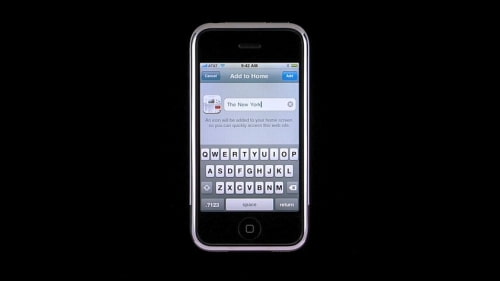


![Apple Releases iOS 26.4.1 and iPadOS 26.4.1 With Bug Fixes [Download]](/images/news/100492/100492/100492-160.jpg "Apple Releases iOS 26.4.1 and iPadOS 26.4.1 With Bug Fixes [Download]")

![Apple TV Debuts 'Criminal Record' Season 2 Trailer [Video]](/images/news/100488/100488/100488-160.jpg "Apple TV Debuts 'Criminal Record' Season 2 Trailer [Video]")






![13-inch MacBook Air M5 Drops to $949 in New All-Time Low [Deal]](/images/news/100466/100466/100466-160.jpg "13-inch MacBook Air M5 Drops to $949 in New All-Time Low [Deal]")




