April 9, 2026

How to Add the iClarified Source to Installer

Posted February 5, 2008 at 2:44am by
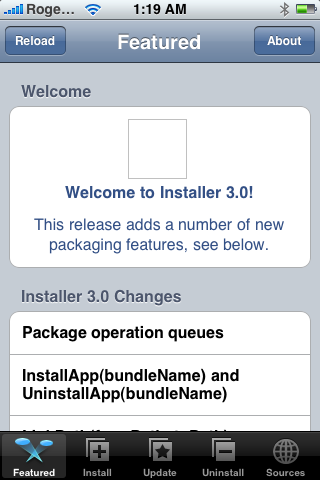
These are step by step instructions on how to add the iClarified source to Installer app.

Step One
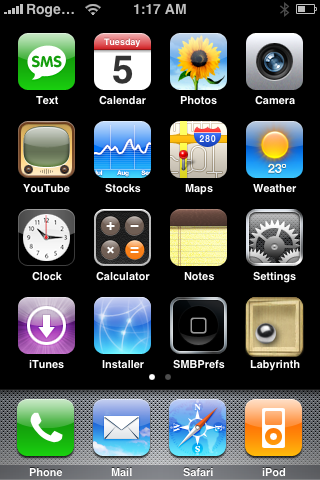
Press the Installer icon on your Springboard to launch it.
How to Add the iClarified Source to Installer

Step Two
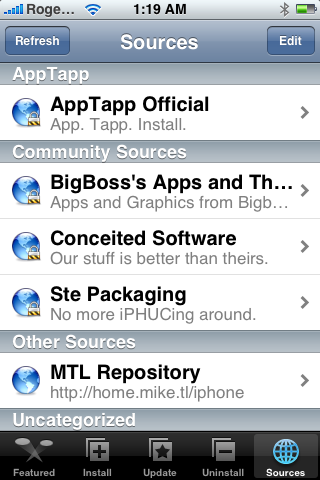
Press to select the Sources tab at the bottom of the screen.
How to Add the iClarified Source to Installer

Step Three
Press the Edit button at the top right of the screen.
How to Add the iClarified Source to Installer

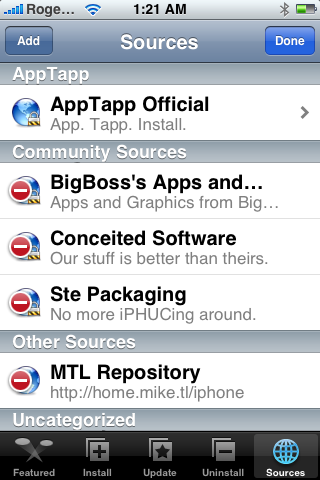
Step Four
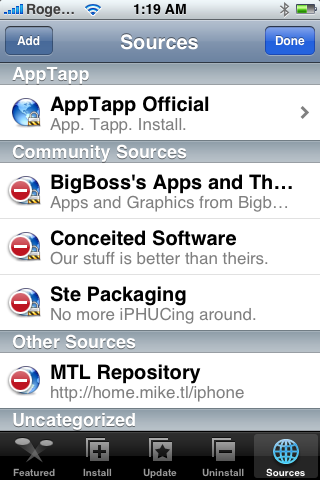
Press the Add button at the top left of the screen.
How to Add the iClarified Source to Installer

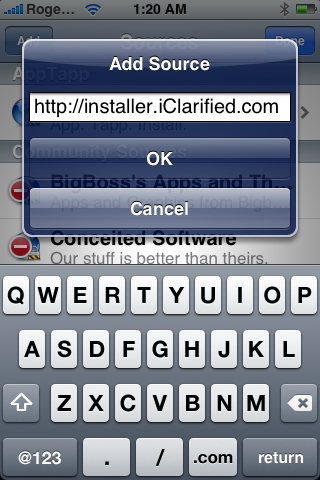
Step Five
Set the source url to http://installer.iClarified.com then press the large OK button.
How to Add the iClarified Source to Installer

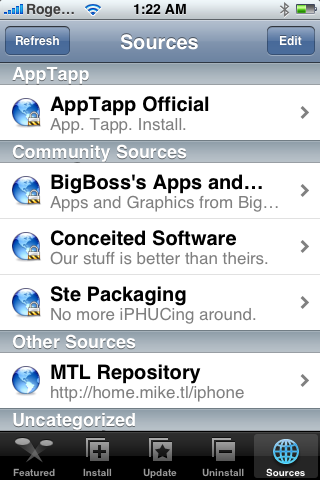
Step Six
Press the Done button at the top right of the screen.
How to Add the iClarified Source to Installer

Step Seven
Press the Install tab at the bottom of the screen.
How to Add the iClarified Source to Installer

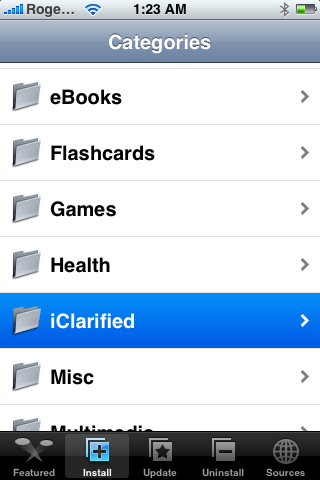
Step Eight
Press to select iClarified from the list of Categories.
How to Add the iClarified Source to Installer


You can now select the desired package for Installation!

Add Comment
Would you like to be notified when someone replies or adds a new comment?
Yes (All Threads)
Yes (This Thread Only)
No
iClarified Icon
Notifications
Would you like to be notified when we post a new Apple news article or tutorial?
Yes
No
Comments (31)
You must login or register to add a comment...
Rajiv B
Rajiv B - January 5, 2018 at 12:22pm
I don't have the installer icon on my iPhone 6s. Pl help. I need to increase the call history
Reply · Like
chanyot
chanyot - July 4, 2011 at 5:55am
I can not add http://installer.cydia.com to my 3gs 4.3.3. How i can do?
Reply · Like
Huy Le
Huy Le - January 4, 2009 at 4:20am
I have the same problem as Lancashire's since I added iClarified as sources but no folder of iClarified seemed to appear in the Categories section. I'm using Installer version 4.xxxx. Any help would be highly appreciated.
Reply · Like
B-DUB
B-DUB - January 6, 2009 at 9:35am
I am having the same problem, did you ever find a way to get it up and running??
Reply · Like
Skandifix
Skandifix - February 10, 2009 at 3:53pm
same problem
Reply · Like
ska
ska - February 12, 2009 at 12:40am
same problem plz help
Reply · Like
Lancashire_lad
Lancashire_lad - January 2, 2009 at 11:06am
I have followed the tutotrial as above but cant seem to install as i dont have the install button,im using 3g version 2.2 windowns? any kno why this is
Reply · Like
Marin
Marin - January 1, 2009 at 11:21am
another thing, my installer app it looks the same only it has a arrow pointing down?
Reply · Like
Marin
Marin - January 1, 2009 at 11:11am
hello it says i have " installer 4.0b11-4 " but when i find iClarified unter souces i dont see a install botton, how would i install it then? thanks
Reply · Like
beeman
beeman - November 14, 2008 at 1:36am
I have a 2g iphone jailbroken with 2.1 firmware (via Pwnage). I added iClarified as an Installer source, but I'm not seeing any new apps. My installer doesn't look quite like this tutorial (ie, there's no "Install" option at the bottom), but I expected to see iClarified listed as a category. Do I have to do something to get installer to pull down apps from iClarified?
Reply · Like
Supercilveks
Supercilveks - October 24, 2008 at 5:10pm
I have Jailbroken my iPhone 3G step by step with this turial : https://www.iclarified.com/entry/index.php?enid=1881 and every thing is working!
Reply · Like
Chili
Chili - September 3, 2008 at 4:13pm
This method not working with latest pwnage (2.0.3.1) and firmware (2.0.2)
Reply · Like
robinall
robinall - August 9, 2008 at 6:25pm
Please update this information for Installer 4.0 beta using PWANGE v 2.0.2 to install apps such as PYSL on a 3G iPhone. How do I load iClarified once I have Installer 4.0 beta on my phone - is thsi all functional or should I wait?
Reply · Like
nicole
nicole - May 20, 2008 at 11:13am
My i phone is frozen. when i turn it on it stays on the balck apple screen. help please!!!
Reply · Like
J
J - May 8, 2008 at 3:56pm
I just finished pwning my iphone to 1.1.4, and when I try to add new sources, by pressing add in the source list, nothing happens, does anyone else have this problem?
Reply · Like
Frank
Frank - March 28, 2008 at 6:23am
Regarding the previous post, this happens even when I tried to uninstall any packages. Thanks.
Reply · Like
michael
michael - January 28, 2009 at 11:38pm
Try downloading iclarified using cydia instead, far better installer than "installer"
Reply · Like
Frank
Frank - March 28, 2008 at 6:20am
I have unlocked and "jailbroken" my phone and use 1.1.4. However, anytime I tried to install a package, I get at the end of the procedure: "Error, Package download failed". And this happens with all installments. Any help is much appreciated.
Reply · Like
Guest
Guest - March 13, 2008 at 9:37am
iClarified.. Thank you...
Reply · Like
iClarified
iClarified - March 13, 2008 at 2:15am
@YuckFou, you will get the installer.app once you jailbreak...
Reply · Like
Guest
Guest - March 12, 2008 at 1:29pm
I am a complete noob to all this so please understand. I am looking at all these tuts, in all these tuts you say click the installer on your springboard, it shows that blue installer icon. My question is this, when i look at the iphone manual i do not see such an icon? Does this come with iphone; or do i have to install it? If i have to install it can someone put me to the correct location on how to do it. Thank you so much for your replies... BTW i just ordered my 16GB Iphone on 3/10, Apple expects it to ship on 3/19, so i am reading the manual via pdf from Apples webiste so as that i am familiar with the phone when i arrives.
Reply · Like
kiran
kiran - February 29, 2008 at 9:00pm
Dear Sir, I have 1.1.2 version , and i unlocked the phone , added app support patch for unsupported countries , added volume patch , let me know whther i have to install iphone region format settings . the problem with my phone is the volume is very low , early in the morning i cannot talk with other in the phone , the person whom i call says that the phone is muted , is there any connection with the iPhone Region Format for All Locales settings , or do i have to install iworld please help me out Sir also tell me is there any necessity to install anySIM1.2U Region format patch (1.1.3) Baseband updater (i havent installed the above yet , please let me know do i have to install all of them , i have a 1.1.2 version phone) please tell me how to overcome the volume problem i have App support Patch (1.1.2) version 1.2 , Volume Boost (1.1.2) version 1.0, Community sources version 3.6 , BSD subsystem version 2.1 , Installer 3.0 version installed please mention is there any other patches to added so that my volume problem is sorted out cheers kiran
Reply · Like
Julien
Julien - February 29, 2008 at 3:34am
Thanks so much!
Reply · Like
mj
mj - February 26, 2008 at 1:16pm
It always show "Package download failed!" , what can i do?
Reply · Like
More Comments
Recent. Read the latest Apple News.
RECENT
Tutorials. Help is here.
TUTORIALS
Where to Download macOS Sequoia
Where to Download macOS Sonoma
AppleTV Firmware Download Locations
Where To Download iPad Firmware Files From
Where To Download iPhone Firmware Files From
Deals. Save on Apple devices and accessories.
DEALS