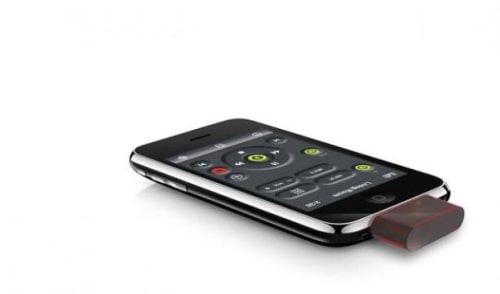
L5 Technology today announced the L5 Remote, an accessory and free app that turn any iPhone or iPod touch into a universal remote control. Launching at ShowStoppers @ CES, the L5 Remote provides consumers with a powerful alternative for replacing multiple and often-confusing remote control devices. The L5 Remote transforms the iPhone and iPod touch into a personal universal remote that controls televisions, DVDs, DVRs, cable boxes, audio equipment, and most other products that come with an infrared remote.
Developed by L5 Technology, the L5 Remote is comprised of a very small hardware device that plugs into an iPhone or iPod touch dock connector, plus a free app to be available from the iTunes App Store. The L5 Remote offers quick and easy set-up using a drag and drop feature, so consumers can create their own ideal, personally customized remote control interface. The L5 Remote is priced at MSRP $49.95 and will be available for purchase in February from the L5 Technology web site www.L5remote.com and retailers nationwide.
“With the fast pace of innovation in the smartphone market, handhelds are becoming the consumer electronics platform of choice, causing disruptions across many markets. We see peripherals that connect smartphones to the physical world as key components in the revolution,” said Wade McNary, CEO of L5 Technology. “Leveraging the power, versatility, and portability of handheld devices, and following Apple’s philosophy of design elegance and simplicity, we have solved a common problem. This one small device reverses a long trend toward complexity in remote controls.”
How Does L5 Remote Work? Consumers purchase the L5 Remote hardware – an adaptor measuring 1.25 x .85 inches – and plug it into the iPhone or iPod touch docking port. They will then be prompted to download a free app from the iTunes App Store, which allows them to simply drag-and-drop any desired combination of buttons to create their own perfect remote control interface. A short, guided training sequence follows, resulting in a smart remote control that replaces their pile of old remotes with a single powerful and convenient one.
Using infrared technology, the L5 Remote can control any number of devices in any number of rooms. Consumers can easily set it up to control products in the living room, bedroom, office, or any other location. The L5 Remote will work to a distance of approximately 30 feet.
The L5 Remote is portable and does not require batteries, Wi-Fi or external power to work. The product can control thousands of devices, including TVs, cable boxes, stereos, DVD players, ceiling fans, air conditioners, and many other products.
Get the iClarified Daily Newsletter
Apple news, rumors, tutorials, price drop alerts, in your inbox every evening, free.
Unsubscribe at any time.
Success!
You have been subscribed.
Add Comment
Would you like to be notified when someone replies or adds a new comment?
Yes (All Threads)
Yes (This Thread Only)
No
Notifications
Would you like to be notified when we post a new Apple news article or tutorial?
Yes
No
Comments (1)
Comments are closed for this article.
0
Owen Densmore - January 5, 2010 at 11:30am
Unfortunately, you have to program the device by one-at-a-time mating the buttons of your existing remotes with the L5. You also have to build your UI yourself, which may be harder than you think.
I hope this all works and can easily be setup, it's certainly a winner!





![Apple Releases iOS 26.4.1 and iPadOS 26.4.1 With Bug Fixes [Download]](/images/news/100492/100492/100492-160.jpg "Apple Releases iOS 26.4.1 and iPadOS 26.4.1 With Bug Fixes [Download]")

![Apple TV Debuts 'Criminal Record' Season 2 Trailer [Video]](/images/news/100488/100488/100488-160.jpg "Apple TV Debuts 'Criminal Record' Season 2 Trailer [Video]")






![13-inch MacBook Air M5 Drops to $949 in New All-Time Low [Deal]](/images/news/100466/100466/100466-160.jpg "13-inch MacBook Air M5 Drops to $949 in New All-Time Low [Deal]")




