Apple has enabled access to its Find My iPhone service from your iPhone and iPod touch.
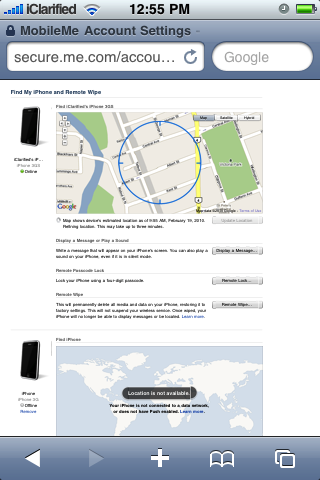
Now, if you lose your iPhone, MobileMe can help you find it. MobileMe includes a new feature called Find My iPhone. Just enable Find My iPhone in MobileMe settings on your phone. Then you can log in to me.com from any computer to access Find My iPhone and display your phone’s approximate location on a map.
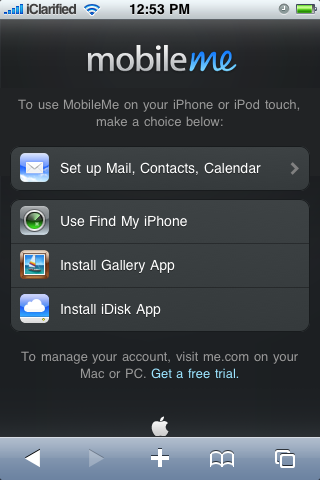
To use Find My iPhone on your mobile device navigate to me.com and press to select the Use Find My iPhone button.
[via Frank]
Get the iClarified Daily Newsletter
Apple news, rumors, tutorials, price drop alerts, in your inbox every evening, free.
Unsubscribe at any time.
Success!
You have been subscribed.
Add Comment
Would you like to be notified when someone replies or adds a new comment?
Yes (All Threads)
Yes (This Thread Only)
No
Notifications
Would you like to be notified when we post a new Apple news article or tutorial?
Yes
No
Comments (6)
Comments are closed for this article.
0
Benjamin - February 20, 2010 at 1:34pm
Perfect way to track your kids ;-) other then that I cant see much use for it.
0
FadetoBlack - February 20, 2010 at 9:59am
To anyone that owns a jailbroken iPhone, Cylay does a MUCH better job at locating your iPhone than MobileMe, and it is only $20 a year as a pose to $100
0
Frank - February 20, 2010 at 4:47pm
Cerebro a free App by big boss does all this for free. It's a
free cydia app.
0
John - February 19, 2010 at 4:59pm
Convenient...if your friend has an iPhone and you lose yours. Otherwise you're just finding yourself!





![Apple Releases iOS 26.4.1 and iPadOS 26.4.1 With Bug Fixes [Download]](/images/news/100492/100492/100492-160.jpg "Apple Releases iOS 26.4.1 and iPadOS 26.4.1 With Bug Fixes [Download]")

![Apple TV Debuts 'Criminal Record' Season 2 Trailer [Video]](/images/news/100488/100488/100488-160.jpg "Apple TV Debuts 'Criminal Record' Season 2 Trailer [Video]")






![13-inch MacBook Air M5 Drops to $949 in New All-Time Low [Deal]](/images/news/100466/100466/100466-160.jpg "13-inch MacBook Air M5 Drops to $949 in New All-Time Low [Deal]")




