Anthropic has updated Claude Code for desktop to work with Apple's iOS Simulator. The integration is available now in public beta.
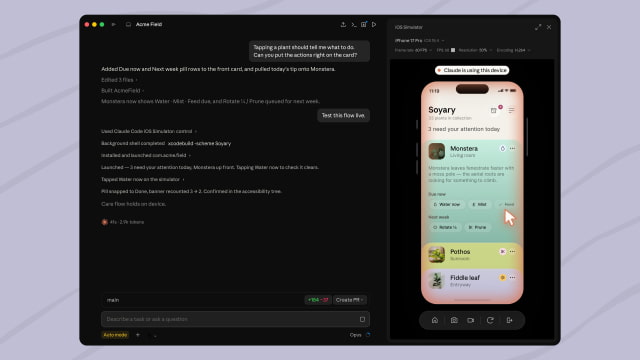
Developers can ask Claude to build and run iOS apps without leaving Claude Code. When Claude launches an app, a live simulator pane opens next to the conversation, allowing it to interact with the app, observe the results, and iterate on the project. Developers can also continue using the simulator while Claude is working.
This differs from Claude's existing computer use feature, which relies on macOS Accessibility and Screen Recording permissions. Instead, the simulator pane communicates directly with Apple's iOS Simulator, so those permissions aren't required.
Claude Code requires a Mac with Xcode and the iOS platform installed. The feature works only in local sessions, since cloud and SSH sessions cannot access simulators running on a local Mac. Each session receives its own simulator, and up to four simulator panes can be open at the same time.
The first time Claude uses a simulated device, the desktop app asks for one-time permission to control it and capture screenshots. Anthropic says screenshots from simulated devices are sent to the company and retained according to standard conversation retention policies. The company recommends avoiding signing in to real accounts on devices that Claude controls.
The feature is now in public beta for Claude Code Desktop on Pro, Max, and Team plans. Full setup instructions are available on Anthropic's support site.
Get the iClarified Daily Newsletter
Apple news, rumors, tutorials, price drop alerts, in your inbox every evening, free.
Unsubscribe at any time.
Success!
You have been subscribed.
Add Comment
Would you like to be notified when someone replies or adds a new comment?
Yes (All Threads)
Yes (This Thread Only)
No
Notifications
Would you like to be notified when we post a new Apple news article or tutorial?



![Boot Speed Test: iPhone Duo vs iPhone 18 Pro Max [Video]](/images/news/103104/103104/103104-160.jpg "Boot Speed Test: iPhone Duo vs iPhone 18 Pro Max [Video]")



![How To Turn Off iPhone [Video]](/images/tutorials/94999/94999/94999-160.jpg "How To Turn Off iPhone [Video]")
![How To Back Up Your iPhone to an External Drive on Mac [Video]](/images/tutorials/72786/72786/72786-160.jpg "How To Back Up Your iPhone to an External Drive on Mac [Video]")

![How To Find Your IP Address on iPhone [Video]](/images/tutorials/496/496/496-160.jpg "How To Find Your IP Address on iPhone [Video]")


![Beats Headphones, Earbuds, and Pill Speaker Are Up to 41% Off [Deal]](/images/news/103026/103026/103026-160.jpg "Beats Headphones, Earbuds, and Pill Speaker Are Up to 41% Off [Deal]")

![New Fire TV Stick 4K Drops to $29.99 (50% Off) [Deal]](/images/news/102984/102984/102984-160.jpg "New Fire TV Stick 4K Drops to $29.99 (50% Off) [Deal]")
![Apple's iPhone 18 Pro and Pro Max Cases Are Up to 37% Off [Deal]](/images/news/102978/102978/102978-160.jpg "Apple's iPhone 18 Pro and Pro Max Cases Are Up to 37% Off [Deal]")
