Photoshop, Firefly, Premiere, Acrobat, Lightroom, and other Adobe apps now work with Slackbot, Slack's built-in AI assistant, while a new Adobe for Slack MCP app brings more than 70 tools to the platform.
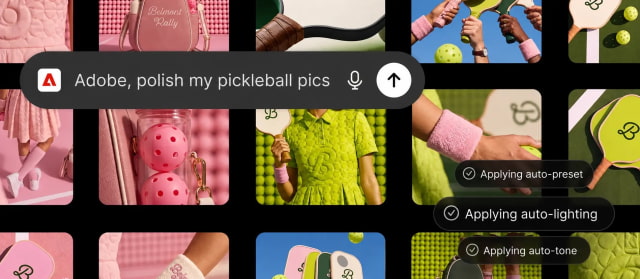
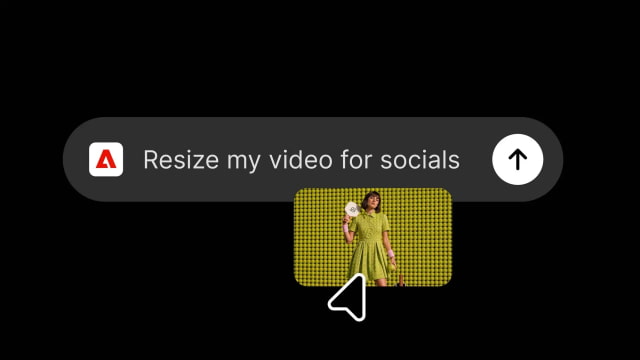
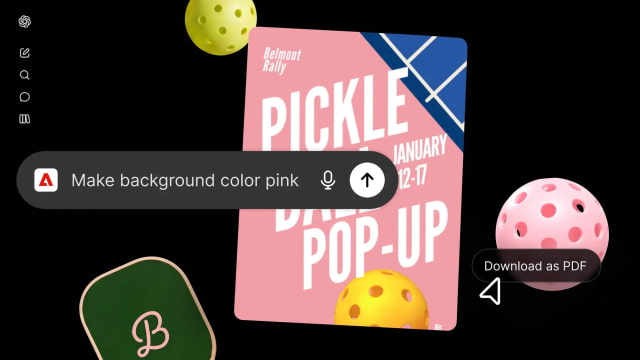
Users can describe what they want to accomplish, and Slackbot calls the appropriate tool while using context from the surrounding conversation. Details from conversations or Canvas can be turned into a PDF, image, or video, while assets from previous campaigns or Creative Cloud can be brought into a chat for editing. The integration can also search existing assets by subject, style, or mood.
Editing capabilities include removing backgrounds and distractions, adjusting lighting and tone, cropping images, and producing multiple variations without leaving Slack.
Adobe for Slack is available globally across desktop, web, and mobile to Slack Business+ and Enterprise+ customers starting today. An Adobe account is not required to get started, while signing in unlocks generative AI features, Creative Cloud files, and continuity across sessions.
The launch builds on Adobe's broader expansion into AI chatbots. Photoshop, Express, and Acrobat arrived in ChatGPT in December 2025, followed in August by a unified Adobe plugin for ChatGPT that combines more than 70 creative and productivity tools. Adobe also supports Claude and Copilot, with a Gemini integration planned.
Deepti Pradeep, Adobe's senior director for agentic AI, told TechCrunch that people using the company's tools in other chatbot apps have gravitated toward repeatable workflows such as batch-editing images and resizing creative. She said focus groups have highlighted the ability to save time, reach the desired result faster, and access Adobe tools wherever people are already working.
Adobe is currently offering promotional discounts on its Creative Cloud Pro plan, including 77% off for students. A free trial is also available on Adobe's website.
Get the iClarified Daily Newsletter
Apple news, rumors, tutorials, price drop alerts, in your inbox every evening, free.
Unsubscribe at any time.
Success!
You have been subscribed.
Add Comment
Would you like to be notified when someone replies or adds a new comment?
Yes (All Threads)
Yes (This Thread Only)
No
Notifications
Would you like to be notified when we post a new Apple news article or tutorial?



![Untethered iOS 27.0.1 Jailbreak Demonstrated on iPhone 18 Pro [Video]](/images/news/102876/102876/102876-160.jpg "Untethered iOS 27.0.1 Jailbreak Demonstrated on iPhone 18 Pro [Video]")
![iPhone Duo May Be Unavailable for Launch-Day Walk-In Purchases [Report]](/images/news/102882/102882/102882-160.jpg "iPhone Duo May Be Unavailable for Launch-Day Walk-In Purchases [Report]")

![Apple Hires Meta's Scott Tucker as Global Litigation Chief [Report]](/images/news/102873/102873/102873-160.jpg "Apple Hires Meta's Scott Tucker as Global Litigation Chief [Report]")


![How To Install Homebrew on Mac [Video]](/images/tutorials/83695/83695/83695-160.jpg "How To Install Homebrew on Mac [Video]")
![How To Back Up Your iPhone to an External Drive on Mac [Video]](/images/tutorials/72786/72786/72786-160.jpg "How To Back Up Your iPhone to an External Drive on Mac [Video]")


![14-Inch MacBook Pro With M5 Pro Drops to $2,069.10 ($429 Off) [Deal]](/images/news/102879/102879/102879-160.jpg "14-Inch MacBook Pro With M5 Pro Drops to $2,069.10 ($429 Off) [Deal]")
![Apple HomeView and New Apple TV 4K Get First Pre-Order Discount on Amazon [Deal]](/images/news/102867/102867/102867-160.jpg "Apple HomeView and New Apple TV 4K Get First Pre-Order Discount on Amazon [Deal]")
![14-Inch MacBook Pro With M5 Max Drops to $3,299 ($800 Off) [Deal]](/images/news/102828/102828/102828-160.jpg "14-Inch MacBook Pro With M5 Max Drops to $3,299 ($800 Off) [Deal]")