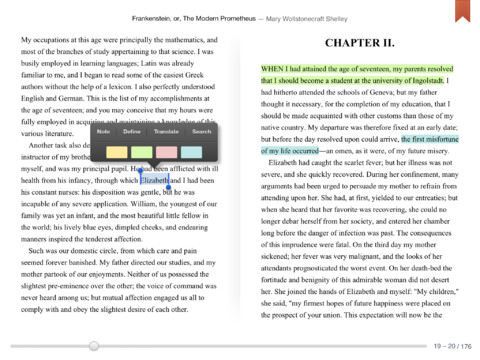
Google Play Books for iOS has been updated with numerous new features including the ability to bookmark, highlight, and translate.
With Google Play Books for iOS start reading today with millions of titles from Google Play on your iPhone, iPod touch, or iPad. Take your favorite books with you on the go and personalize your reading experience. Shop books in your browser on Google Play.
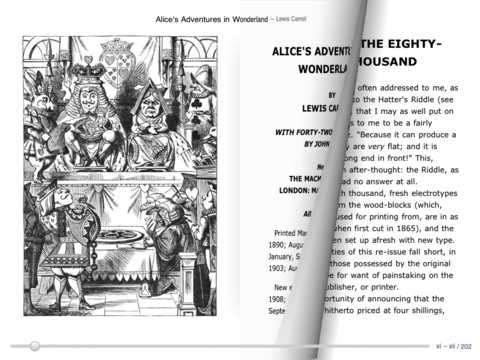
Great Reading Experience - Change font, search within the book, information about book - Manage your library (archive books after reading) - Night-reading mode - Read books offline - VoiceOver support
Discover Millions of Titles on Google Play - Over 4 million books in every imaginable category, from the New York Times® bestsellers to favorite classics - Millions of free books available instantly - Free preview pages - Unlimited storage of books in the digital cloud - Worry-free archive
Syncs With Your Google Play books library - Access all your books wirelessly from the digital cloud - Automatic page position syncing across devices -- pick up reading where you left off.
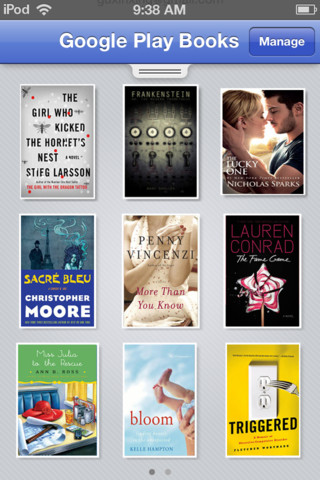
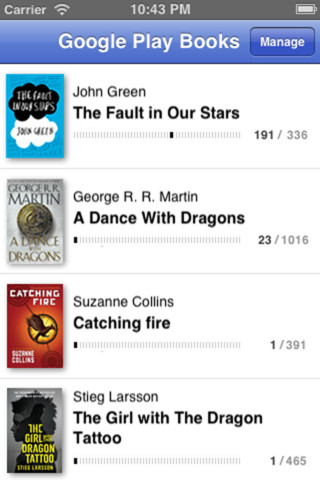
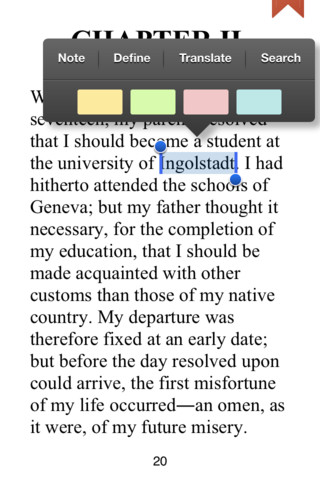
What's New In This Version: Many new features in flowing text mode, including: • Bookmark a page by tapping the top right corner • Touch and hold to select some text • Highlight selected text with color • Add a private note to selected text • Highlighting and notes sync with Google Play web reader and your other iOS devices • Translate selected text into 50+ languages • Look up definition of a selected word • Search for selected text in Wikipedia, with Google or in the book +1 button lets you tell the world which books you love View your library as a grid or list on iPhone and iPod touch Bug fixes
You can download Google Play Books from the App Store for free.




![Pro Photographer Austin Mann Tests iPhone 18 Pro Camera [Video]](/images/news/102297/102297/102297-160.jpg "Pro Photographer Austin Mann Tests iPhone 18 Pro Camera [Video]")

![Apple Releases Xcode 27.1 Beta With iPhone Duo SDKs and Simulator [Download]](/images/news/102276/102276/102276-160.jpg "Apple Releases Xcode 27.1 Beta With iPhone Duo SDKs and Simulator [Download]")
![Apple Shares 'new trick' Shot on iPhone 18 Pro Ad Featuring ROSÉ [Video]](/images/news/102273/102273/102273-160.jpg "Apple Shares 'new trick' Shot on iPhone 18 Pro Ad Featuring ROSÉ [Video]")









![Apple Studio Display XDR Hits All-Time Low of $2,969.99 ($329 Off) [Deal]](/images/news/101976/101976/101976-160.jpg "Apple Studio Display XDR Hits All-Time Low of $2,969.99 ($329 Off) [Deal]")
