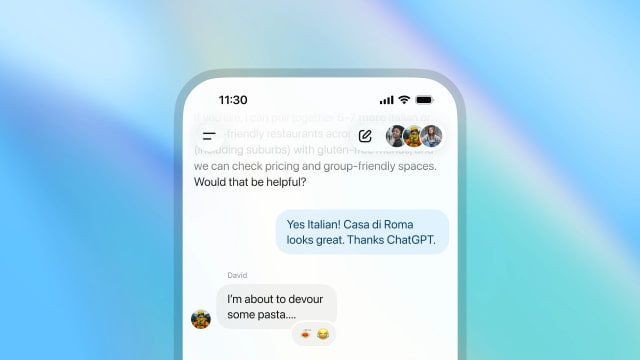
OpenAI is piloting a new group chat feature for ChatGPT, letting multiple people and the AI collaborate in the same conversation. The pilot has started rolling out on mobile and the web for users in Japan, New Zealand, South Korea, and Taiwan across the Free, Go, Plus, and Pro plans.
Group chats let friends, family, or coworkers plan trips, organize events, compare ideas, or work through projects together with ChatGPT joining in when needed. Each group has its own chat history. Your personal ChatGPT memory is not used, and the AI does not create new memories from these conversations.
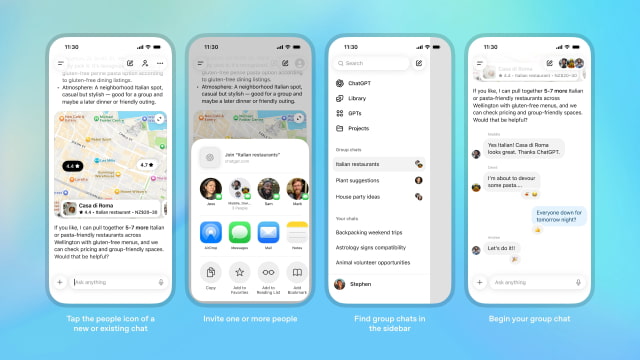
To start a group, users can tap the people icon in the top-right corner of a chat. You can create a new group or add people to an existing thread. When someone is added, ChatGPT makes a copy as a new group so the original conversation remains private. Invitations are sent through shareable links that support one to twenty participants. When you create or join your first group, ChatGPT asks for a simple profile containing your name, username, and photo.
Inside the group, ChatGPT responds using GPT-5.1 Auto, which selects the best model based on the subscription tier of the person it is replying to. Features such as search, image generation, dictation, file uploads, and image uploads work normally. Rate limits apply only when ChatGPT responds. Each reply counts toward the limit of the user who prompted it, and messages between users are not affected.
OpenAI says the model has been updated to behave more naturally in multi-person conversations. It follows the flow of the discussion, decides when to speak, and can be prompted by mentioning its name. It can also react with emojis and reference group members' profile photos when creating personalized images.
Group settings allow users to rename the chat, add or remove participants, mute notifications, or set custom instructions for how ChatGPT should respond. These instructions can define tone, level of detail, or additional context.
Joining a group requires accepting an invitation. Anyone can leave at any time. Group members may remove other participants, although the creator can only be removed by leaving the chat. If someone under 18 is present, ChatGPT automatically reduces exposure to sensitive content for everyone in the group, and parents can disable group chats entirely through parental controls.
OpenAI says this pilot is an early step toward shared experiences in ChatGPT. The company plans to expand to more regions after gathering feedback from early users.
You can download ChatGPT from the App Store at the link below.



![Apple Releases HomePod Software Update 27 [Download]](/images/news/102222/102222/102222-160.jpg "Apple Releases HomePod Software Update 27 [Download]")

![Apple Officially Releases visionOS 27 [Download]](/images/news/102219/102219/102219-160.jpg "Apple Officially Releases visionOS 27 [Download]")








![Apple Studio Display XDR Hits All-Time Low of $2,969.99 ($329 Off) [Deal]](/images/news/101976/101976/101976-160.jpg "Apple Studio Display XDR Hits All-Time Low of $2,969.99 ($329 Off) [Deal]")
![Apple AirPods Pro 3 Drop to $199 ($50 Off) [Deal]](/images/news/101966/101966/101966-160.jpg "Apple AirPods Pro 3 Drop to $199 ($50 Off) [Deal]")
