Google is expanding the role of its Gemini assistant on Google TV, rolling out an update that adds richer visual responses and narrated summaries for sports and educational content. The changes are aimed at making it easier to get quick answers without reaching for a second device while watching.
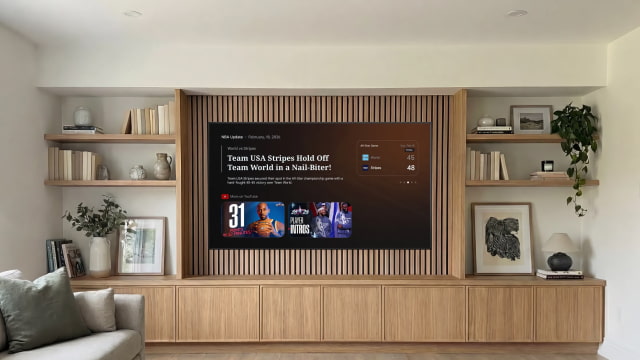
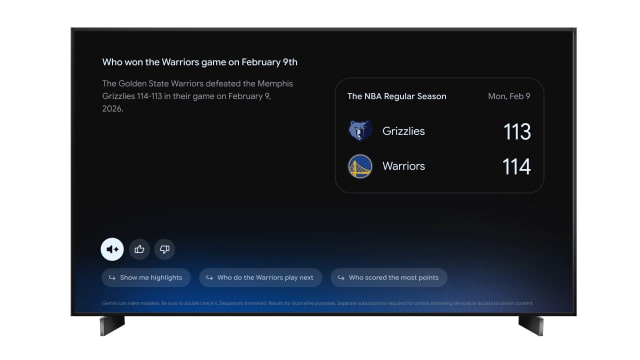
Instead of returning blocks of text, Gemini now adjusts how results are presented based on the question. Recipe searches surface video tutorials, while sports queries bring up live scorecards along with where to watch. The system combines visuals, video, and text to surface useful information more quickly, without sending users through multiple menus.
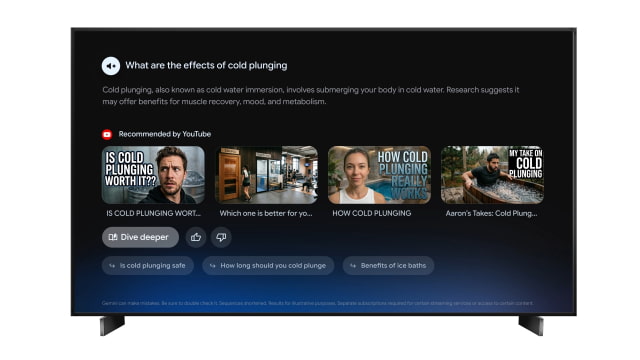
Google is also introducing a new "Deep Dives" feature, which brings narrated visual breakdowns to topics like technology, economics, and health. Each session walks through a subject step by step, with prompts along the way that let you continue exploring if you want to go further. You can start one by asking a question and selecting "Dive deeper," or by heading to the "Learn" section in the Gemini tab.
For sports, Gemini is getting a new "Sports Briefs" section covering leagues such as the NBA, NHL, MLB, MLS, and NWSL. It provides short, narrated recaps with key highlights and player updates, offering a quick way to catch up without digging through apps or feeds.
The update comes as Apple gets ready to roll out a new set of AI features across its platforms. The company recently scheduled WWDC 2026 for June 8, where it is expected to unveil tvOS 27 alongside its other major updates. Apple has selected Google's Gemini models to support its next-generation assistant features, which are rumored to include a chatbot-style Siri experience.
Richer visual responses begin rolling out today on Gemini-enabled devices in the U.S. and Canada. Deep Dives and Sports Briefs are initially available in the U.S., with broader device support and additional regions, including Great Britain and Australia, expected to follow this spring.
Get the iClarified Daily Newsletter
Apple news, rumors, tutorials, price drop alerts, in your inbox every evening, free.
Unsubscribe at any time.
Success!
You have been subscribed.
Add Comment
Would you like to be notified when someone replies or adds a new comment?
Yes (All Threads)
Yes (This Thread Only)
No
Notifications
Would you like to be notified when we post a new Apple news article or tutorial?








![How To Change Wallpaper on Mac [Video]](/images/tutorials/90512/90512/90512-160.jpg "How To Change Wallpaper on Mac [Video]")
![How To Turn Off Always On Display on iPhone [Video]](/images/tutorials/87524/87524/87524-160.jpg "How To Turn Off Always On Display on iPhone [Video]")





![16-Inch M5 Max MacBook Pro Drops $900 to New Low of $3,499 [Deal]](/images/news/102438/102438/102438-160.jpg "16-Inch M5 Max MacBook Pro Drops $900 to New Low of $3,499 [Deal]")
![Magic Keyboard for iPad Air Drops to $200 on Amazon [Deal]](/images/news/102402/102402/102402-160.jpg "Magic Keyboard for iPad Air Drops to $200 on Amazon [Deal]")
