The iPhone 18 Pro gives iPhone 16 Pro owners a new Main camera, a different approach to telephoto zoom, and substantially longer battery ratings. It also promises a much quicker wired top-up. The screen stays the same size, though the phone itself gets a little thicker and heavier.
Whether those changes justify an upgrade depends largely on how you use the cameras and how well your current battery holds up. The iPhone 16 Pro already has a 48MP Ultra Wide camera, Camera Control, and 4K/120 fps video, so here's where the two-year jump makes the biggest difference.
The iPhone 16 Pro's 48MP Main camera has a fixed f/1.78 aperture. On iPhone 18 Pro, the new 48MP Main camera can switch between f/1.48, f/1.8, f/2.8, and f/4.0. A wider opening lets in more light; a narrower one brings more of the scene into focus. That gives the new phone more flexibility for everything from a dimly lit portrait to a group arranged at different distances from the camera.
The iPhone 16 Pro pairs its 48MP Main and Ultra Wide cameras with a 12MP 5x telephoto.
On iPhone 18 Pro, aperture adjustment can happen automatically, or you can choose a setting using the new Pro controls in Apple's Camera app. Those controls also provide access to shutter speed and white balance. The new Main camera is the most distinctive reason for a 16 Pro owner to consider upgrading.
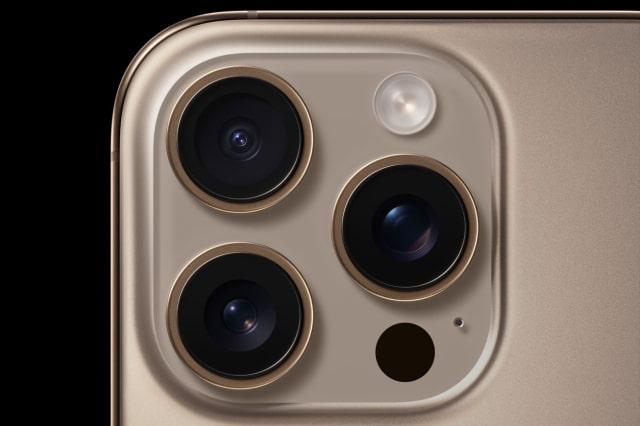
Apple's iPhone 18 Pro camera sample uses f/4 to keep people and background details in focus.
Telephoto changes are more nuanced. The iPhone 16 Pro has a dedicated 12MP 5x camera with a 120mm-equivalent lens. The iPhone 18 Pro uses a 48MP camera with a 4x, 100mm-equivalent lens, plus a 12MP optical-quality 8x crop from that sensor. You gain the longer 8x framing option, while the dedicated lens starts a little wider than the 16 Pro's 5x.
Both phones have a 48MP Ultra Wide camera and a 12MP 2x option derived from the Main sensor. Up front, the 18 Pro replaces the 16 Pro's 12MP TrueDepth camera with an 18MP Center Stage camera, giving selfies and video calls a newer camera system as well.
More Editing Options, With 4K/120 Already on Both
Both models record 4K Dolby Vision at up to 120 fps on the Main camera, and both support ProRes at up to 4K/120 fps when recording to external storage. If those are the features you use most, the iPhone 16 Pro already handles them.
The iPhone 18 Pro adds rear-camera Cinematic mode at up to 4K/60 fps, compared with 4K/30 fps on the 16 Pro, and lets you apply Cinematic effects after capture. It also supports ProRes RAW through compatible apps and Genlock with supported third-party hardware and software. These are useful additions for more involved video work, rather than a reason every casual video shooter needs to switch.
Longer Battery Ratings and a Faster Top-Up
Apple rates the U.S. iPhone 18 Pro for up to 36 hours of video playback and 33 hours of streamed video. The iPhone 16 Pro's corresponding launch ratings were 27 and 22 hours. Apple tested each generation separately. Actual battery life depends on your usage, but the newer phone's ratings offer a compelling reason to look beyond the camera changes.
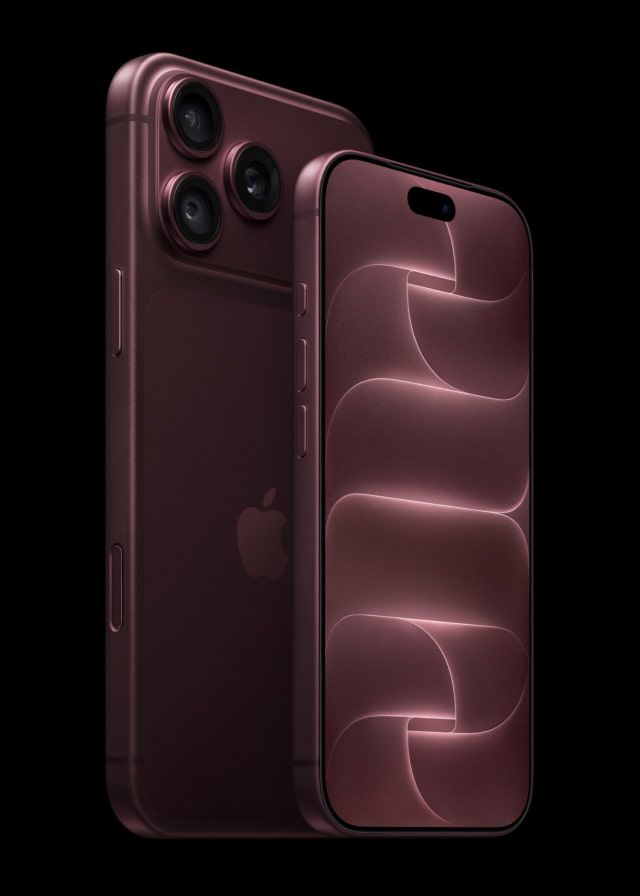
The iPhone 18 Pro, shown front-facing beside the Pro Max, has longer battery ratings than iPhone 16 Pro.
For wired charging, the 18 Pro can reach up to 50% in around 15 minutes with a 60W-capable USB PD 3.1 or newer adapter supporting Adjustable Voltage Supply, plus a 60W-capable USB-C cable. The 16 Pro's stated time is around 30 minutes with a 20W-or-higher adapter. Reaching the new phone's quickest time may therefore mean changing your charger as well as your phone.
MagSafe rises from up to 22.5W on the smaller iPhone 16 Pro to up to 25W on iPhone 18 Pro. Apple lists a 35W-or-higher adapter and compatible MagSafe Charger for the 18 Pro's up-to-50%-in-30-minutes wireless claim. Battery figures here use the U.S. models; Apple lists lower video-playback ratings for iPhone 18 Pro versions with a physical SIM tray.
The Same Screen Size in a Heavier Phone
Both phones have a 6.3-inch OLED display with the same 2622-by-1206 resolution, ProMotion up to 120Hz, and an always-on display. The 18 Pro raises peak outdoor brightness from 2000 to 3000 nits and adds an anti-reflective coating. Its smaller Dynamic Island also takes up less space at the top.
The body changes from titanium on the 16 Pro to an aluminum unibody on the 18 Pro, with Ceramic Shield 2 on the front and Ceramic Shield on the back. The new phone measures 150 × 71.9 × 8.75mm and weighs 211 grams, compared with 149.6 × 71.5 × 8.25mm and 199 grams. That's a modest footprint change, but an extra 12 grams and half a millimeter of thickness.
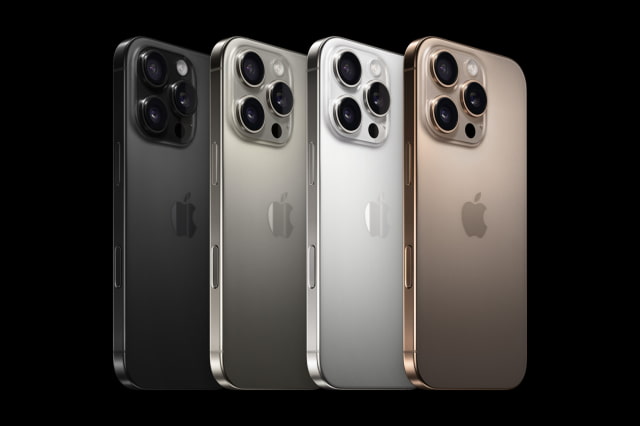
The iPhone 16 Pro family came in black, white, natural, and desert titanium. The 18 Pro switches to black, silver, glacier, and burgundy.
New Hardware, With iOS 27 on Both
The iPhone 18 Pro moves from A18 Pro to A20 Pro, including a seven-core GPU and dual 16-core Neural Engine. It also moves from Bluetooth 5.3 to Bluetooth 6. Both models already support Wi-Fi 7 and USB 3 transfers up to 10Gb/s with a compatible cable.
Both support Apple Intelligence and are compatible with iOS 27, which arrived September 14. You can keep the 16 Pro and still receive the software update; the strongest reasons to buy the 18 Pro are its hardware changes.
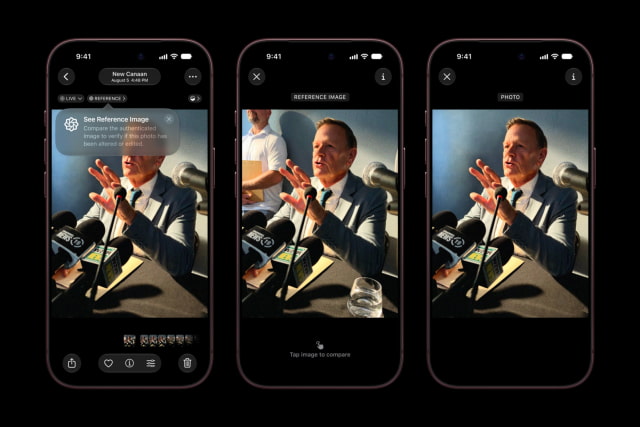
One hardware-specific addition is Apple Reference Image capture on iPhone 18 Pro. Opting in records signed Main-camera sensor data that Private Cloud Compute develops into an unalterable reference image, letting you compare the original capture with your edited photo. The iPhone 16 Pro does not gain that capture capability. Reference capture won't be available in the EU at launch, and the feature won't be available in China at launch.
Apple Reference Image capture is an iPhone 18 Pro feature, with regional restrictions at launch.
iPhone 18 Pro vs. iPhone 16 Pro Specifications
Feature
iPhone 16 Pro
iPhone 18 Pro
U.S. starting price at original launch
$999 (128GB)
$1,199 (256GB)
Storage options
128GB, 256GB, 512GB, 1TB
256GB, 512GB, 1TB, 2TB
Display
6.3-inch OLED; ProMotion up to 120Hz
6.3-inch OLED; up to 120Hz
Resolution / density
2622 × 1206; 460 ppi
2622 × 1206; 460 ppi
Brightness
1000 nits typical; 1600 HDR; 2000 outdoors
1000 nits typical; 1600 HDR; 3000 outdoors
Body / glass
Titanium; Ceramic Shield front; matte glass back
Aluminum; Ceramic Shield 2 front; Ceramic Shield back
Up to 4K/120 fps externally; ProRes RAW via compatible apps
Rear Cinematic mode
Up to 4K Dolby Vision/30 fps
Up to 4K Dolby Vision/60 fps; effects after capture
Video playback (Apple U.S. rating)
Up to 27 hours
Up to 36 hours
Streamed video (Apple U.S. rating)
Up to 22 hours
Up to 33 hours
Wired fast charging
Up to 50% in about 30 min; 20W+ USB-C adapter
Up to 50% in about 15 min; 60W+ USB PD 3.1 AVS adapter and 60W-capable USB-C cable
MagSafe wireless charging
MagSafe up to 22.5W; compatible 30W+ adapter
MagSafe up to 25W; 35W+ adapter for 50% in 30 min
Wi-Fi / Bluetooth
Wi-Fi 7; Bluetooth 5.3
Wi-Fi 7; Bluetooth 6
USB port
USB-C; USB 3 up to 10Gb/s with compatible cable
USB-C; USB 3 up to 10Gb/s with compatible cable
Camera / shortcut buttons
Action button and Camera Control
Action button and Camera Control
Biometric unlock
Face ID
Face ID
Water and dust resistance
IP68; tested to 6m for 30 minutes
IP68; tested to 6m for 30 minutes
Finishes
Black, white, natural, desert titanium
Black, silver, glacier, burgundy
Software compatibility
iOS 27 compatible; Apple Intelligence supported
iOS 27; Apple Intelligence supported
Should You Upgrade After Two Years?
The iPhone 18 Pro is most appealing if you use your camera heavily or regularly run short on battery. Variable aperture, the new telephoto setup, longer battery ratings, and faster wired charging are tangible changes in a phone with the same display size.
Keeping the iPhone 16 Pro makes sense if it still gets you through the day and you're happy with its photos. It retains a capable camera system, a 120Hz display, fast USB transfers, and support for iOS 27. If battery wear is your main complaint, compare the cost of battery service with a full upgrade before deciding.
The 18 Pro starts at $1,199 with 256GB, versus the 16 Pro's original $999 launch price with 128GB. The extra $200 in starting price comes with twice the base storage. Pre-orders for the 18 Pro began September 12, with initial availability September 18.
Get the iClarified Daily Newsletter
Apple news, rumors, tutorials, price drop alerts, in your inbox every evening, free.
Unsubscribe at any time.
Success!
You have been subscribed.
Add Comment
Would you like to be notified when someone replies or adds a new comment?
Yes (All Threads)
Yes (This Thread Only)
No
Notifications
Would you like to be notified when we post a new Apple news article or tutorial?




![Meta Adds Real-Time Voice Conversations and Expressive Avatars to Muse [Video]](/images/news/103320/103320/103320-160.jpg "Meta Adds Real-Time Voice Conversations and Expressive Avatars to Muse [Video]")
![Apple Releases First Public Betas of iOS 27.3, iPadOS 27.3, macOS 27.3, and More [Download]](/images/news/103317/103317/103317-160.jpg "Apple Releases First Public Betas of iOS 27.3, iPadOS 27.3, macOS 27.3, and More [Download]")
![Apple Debuts 'Bad Monkey' Season 2 Trailer Starring Vince Vaughn [Video]](/images/news/103314/103314/103314-160.jpg "Apple Debuts 'Bad Monkey' Season 2 Trailer Starring Vince Vaughn [Video]")

![MacBook Pro PROLED XDR Review Roundup: OLED Impresses, Touch Divides [Video]](/images/news/103305/103305/103305-160.jpg "MacBook Pro PROLED XDR Review Roundup: OLED Impresses, Touch Divides [Video]")
![How To Back Up Your iPhone to an External Drive on Mac [Video]](/images/tutorials/72786/72786/72786-160.jpg "How To Back Up Your iPhone to an External Drive on Mac [Video]")
![How To Sideload Apps Onto Your iPhone Using Xcode [Video]](/images/tutorials/52314/52314/52314-160.jpg "How To Sideload Apps Onto Your iPhone Using Xcode [Video]")
![How To Find Your IP Address on iPhone [Video]](/images/tutorials/496/496/496-160.jpg "How To Find Your IP Address on iPhone [Video]")


![Mac mini and Mac Studio Hit All-Time Lows, Up to $200 Off [Deal]](/images/news/103290/103290/103290-160.jpg "Mac mini and Mac Studio Hit All-Time Lows, Up to $200 Off [Deal]")
![M5 MacBook Air Up to $200 Off, 13-Inch From $1,099.99 [Deal]](/images/news/103233/103233/103233-160.jpg "M5 MacBook Air Up to $200 Off, 13-Inch From $1,099.99 [Deal]")
![Apple Watch Ultra 4 Drops Back to All-Time Low of $699.99 ($99 Off) [Deal]](/images/news/103218/103218/103218-160.jpg "Apple Watch Ultra 4 Drops Back to All-Time Low of $699.99 ($99 Off) [Deal]")
![AirTag 2 4-Pack Hits All-Time Low of $69.99 ($29 Off) [Deal]](/images/news/103203/103203/103203-160.jpg "AirTag 2 4-Pack Hits All-Time Low of $69.99 ($29 Off) [Deal]")

