Apple has released new child safety and parental control features for iPhone, iPad, and Mac, giving parents more control over the content children can access, who they can communicate with, and when they can use apps.
New Parental Controls
The features were previewed in June and are now available through the Screen Time update included with Apple's latest software releases.
The update includes:
● A simpler setup process that recommends a set of essential apps for new child accounts.
● Ask to Browse, which lets parents require approval before a child opens a new website in Safari.
● Expanded Communication Safety protections that can block gore and violent content, in addition to nudity, in shared photos and videos and during live FaceTime calls.
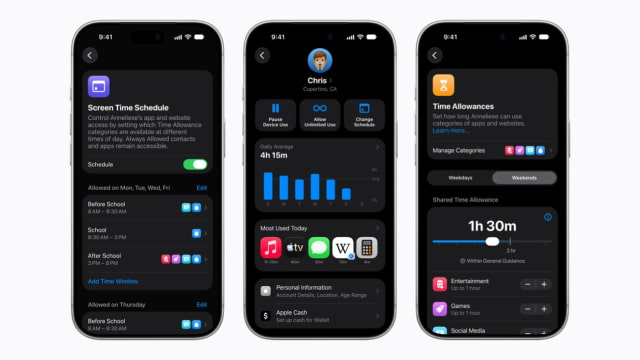
● Time Allowances, with age-tailored guidance for managing time spent in categories such as Social Media, Entertainment, and Games.
● A redesigned Screen Time interface with an at-a-glance usage view and one-tap controls for adjusting access.
Apple says the features were informed by online safety and health experts, including the American Academy of Pediatrics. The company is also working with the organization to adapt its Family Media Plan into a guide that parents can reference when using Apple products.
A new Apple child safety website provides additional details about the tools and instructions for getting started.
Availability
The new controls are available now with the Screen Time update in iOS 27 and iPadOS 27, as well as macOS 27. Every device in a Family Sharing group must be updated to iOS 27, iPadOS 27, macOS 27, watchOS 27, or visionOS 27, as applicable, to use the updated Screen Time features.
Some features may not be available in every region, language, or on every device model.
Get the iClarified Daily Newsletter
Apple news, rumors, tutorials, price drop alerts, in your inbox every evening, free.
Unsubscribe at any time.
Success!
You have been subscribed.
Add Comment
Would you like to be notified when someone replies or adds a new comment?
Yes (All Threads)
Yes (This Thread Only)
No
Notifications
Would you like to be notified when we post a new Apple news article or tutorial?



![Apple Addresses iPad mini's Lack of ProMotion [Video]](/images/news/103194/103194/103194-160.jpg "Apple Addresses iPad mini's Lack of ProMotion [Video]")

![Samsung Is Sole Supplier of Apple's OLED MacBook Pro Displays [Report]](/images/news/103188/103188/103188-160.jpg "Samsung Is Sole Supplier of Apple's OLED MacBook Pro Displays [Report]")


![How To Turn Off iPhone [Video]](/images/tutorials/94999/94999/94999-160.jpg "How To Turn Off iPhone [Video]")
![How To Back Up Your iPhone to an External Drive on Mac [Video]](/images/tutorials/72786/72786/72786-160.jpg "How To Back Up Your iPhone to an External Drive on Mac [Video]")
![How To Find Your IP Address on iPhone [Video]](/images/tutorials/496/496/496-160.jpg "How To Find Your IP Address on iPhone [Video]")



![Beats Headphones, Earbuds, and Pill Speaker Are Up to 41% Off [Deal]](/images/news/103026/103026/103026-160.jpg "Beats Headphones, Earbuds, and Pill Speaker Are Up to 41% Off [Deal]")

![New Fire TV Stick 4K Drops to $29.99 (50% Off) [Deal]](/images/news/102984/102984/102984-160.jpg "New Fire TV Stick 4K Drops to $29.99 (50% Off) [Deal]")
![Apple's iPhone 18 Pro and Pro Max Cases Are Up to 37% Off [Deal]](/images/news/102978/102978/102978-160.jpg "Apple's iPhone 18 Pro and Pro Max Cases Are Up to 37% Off [Deal]")
