Apple has announced new Split View multitasking features and Picture and Picture for the iPad.
Here are some of the highlights:
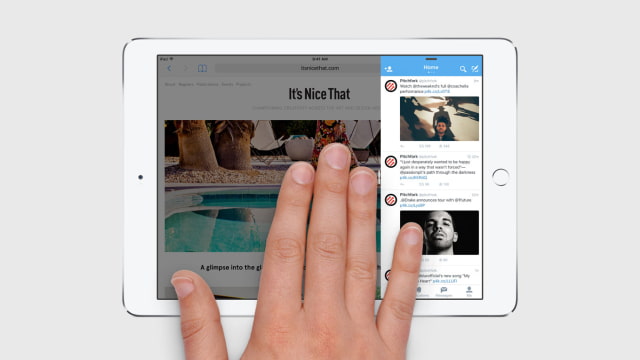
● Slide Over lets you open a second app without leaving the one you’re in.
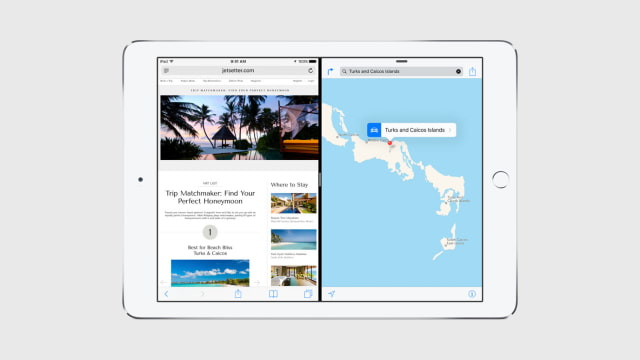
● Split View allows two apps to be open and active at the same time on the same screen.
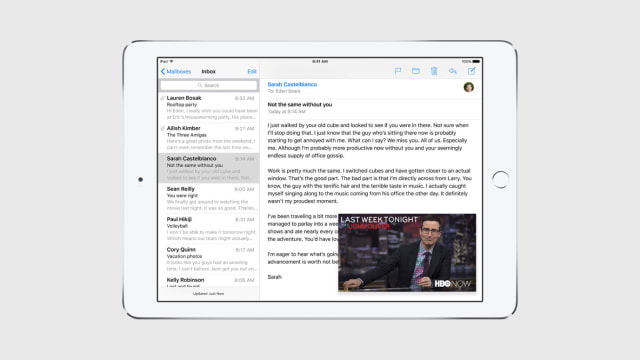
● Picture in Picture scales a video down in size so you can keep watching a TV show while you reply to an email.
Developer APIs will be available for Picture in Picture, Slide Over, and Split View.
Please follow iClarified on X, Facebook, or RSS for updates.
Get the iClarified Daily Newsletter
Apple news, rumors, tutorials, price drop alerts, in your inbox every evening, free.
Unsubscribe at any time.
Success!
You have been subscribed.
Add Comment
Would you like to be notified when someone replies or adds a new comment?
Yes (All Threads)
Yes (This Thread Only)
No
Notifications
Would you like to be notified when we post a new Apple news article or tutorial?
Yes
No
Comments (15)
Comments are closed for this article.
0
kudus - June 10, 2015 at 6:45am
wow the multitasking looks like google card recent menu. :O
0
paulMOGG - June 9, 2015 at 12:29am
So when is it available that's what I would like to know ?
0
Woz - June 8, 2015 at 8:29pm
Doesn't Samsung tablets already do this? Isn't apple just copying Samsung?
0
gamerscul9870 - June 8, 2015 at 8:31pm
that don't do it the way Apple does it now. All they did was just have 2 apps that don't change in any way except using different apps. No copying here.
0
Woz - June 9, 2015 at 10:49pm
Please Steve tell me the difference between apple's multitasking and Samsung's?
And based on your definition of copying then Samsung never copied Apple. Good to know.
0
gamerscul9870 - June 9, 2015 at 11:51pm
not only are you scrolling through more apps to see them in multitask view, if you were to watch a video, it follows you and you can position it anywhere or put it off to the side to listen to audio only until you're done with it, plus you have options to use one of the apps with the one your in and will stay open and show up with other apps to go to and choose whether to have 2 together at the same time, even resize it to have phone interface either in portrait or landscape. Samsung never copied Apple? Flashback- fingerprint scanner, 64 bit support, iPhone like design for the s1 and s5 and EarPods design, plus the apps on android 1, and the list goes on.
0
Bad luck - June 10, 2015 at 2:50pm
you are thinking of when samsung first came out with this multitasking feature. Samsungs devices are not just split screening. It's evolved already at least a year ago. Samsung also has Picture in picture. They have actually made it to where it's more of a desktop class of multitasking. YES. Desktop class where you can have 10 individual windows up and all playing 10 YouTube videos at the same time and you can resize them all and move them to any angle or area of the screen. They are not attached to each other in any way. They even have the whole windows top bar to exit, minimize, and expand the screen. It's like opening up the chrome browser and then opening up 10 more individual chrome browsers where you can move them all freely. And if you wanted to see your homes screen and click on another app just minimize everything or drag the opened apps or browsers down or to the side to get them out of the way and the desktop is behind all that. Don't give out false info.
0
Bad luck - June 10, 2015 at 2:52pm
So yes a simple video following you is something samsung has done for quite some time now. If you don't believe me look it up on a video or maybe some google images. It's there.
0
Woz - June 10, 2015 at 4:44pm
Fingerprint scanner? Samsung copied Apple? Apple didn't invent the fingerprint scanner. They copied it from Motorola. 64 bit processor? Intel made that a long time ago. Plus what does a 64 bit processor help on a cellphone? Does it make it faster? Only if you are doing fractal math. Design? You mean a rectangle with a screen. Apple copied that too. Nice try.
0
Mohamad Amirkhalili - June 8, 2015 at 8:11pm
Is split screen only on iPad Air 2? Are you kidding me?
0
gamerscul9870 - June 8, 2015 at 8:19pm
Cough, iOS 9 features like any feature a new iOS would bring to any device, cough.
0
Mohamad Amirkhalili - June 9, 2015 at 4:56am
No, the split screen feature is just for iPad Air 2 and the Slide Over feature is for all iPads! There is a difference.
0
odedoo1 - June 9, 2015 at 7:24am
It's totally bull, all iPads from 4 and up could run split screen easy, in fact on my old ipad 3 which was jail broken it ran 4 screens easy so now they say my Air can't handle it? Well I say it's all about money, Apple want to sell more new iPads because to many people are satisfied with their old ones, and I'm not moving from my iPad Air till I see a big change that will make it worth it, like the super iPad everyone is talking about.
0
gamerscul9870 - June 8, 2015 at 7:32pm
I like it, the way you switch between apps, the video following you while you do anything else, and much more!
0
Kiddelton - June 8, 2015 at 6:23pm
Need it on the iPhone too would be great on the iPhone 6 up







![Apple Home Hub With Siri AI in Employee Testing, Could Debut in October [Gurman]](/images/news/102309/102309/102309-160.jpg "Apple Home Hub With Siri AI in Employee Testing, Could Debut in October [Gurman]")

![Apple Cuts Fitness+ Jobs as It Rethinks the Service [Report]](/images/news/102306/102306/102306-160.jpg "Apple Cuts Fitness+ Jobs as It Rethinks the Service [Report]")










![Apple Studio Display XDR Hits All-Time Low of $2,969.99 ($329 Off) [Deal]](/images/news/101976/101976/101976-160.jpg "Apple Studio Display XDR Hits All-Time Low of $2,969.99 ($329 Off) [Deal]")
