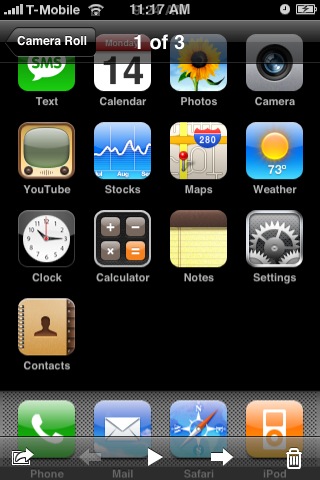
Apple has included and enabled the capability to easily take screenshots in its latest iPhone 2.0 Beta Firmware.
To take a screenshot simply hold down the Home button and then press and release the Power button.
The screenshot will then be placed directly in your Camera Roll for easy access and syncing to your computer.
Thanks to Victor for the heads up!
In the last few days several new iPhone features have been discovered such as: Save Photo and Contact Search
To take a screenshot simply hold down the Home button and then press and release the Power button.
The screenshot will then be placed directly in your Camera Roll for easy access and syncing to your computer.
Thanks to Victor for the heads up!
In the last few days several new iPhone features have been discovered such as: Save Photo and Contact Search


![Apple Developing AI Home Camera That Doesn't Record Video [Report]](/images/news/102888/102888/102888-160.jpg "Apple Developing AI Home Camera That Doesn't Record Video [Report]")
![Untethered iOS 27.0.1 Jailbreak Demonstrated on iPhone 18 Pro [Video]](/images/news/102876/102876/102876-160.jpg "Untethered iOS 27.0.1 Jailbreak Demonstrated on iPhone 18 Pro [Video]")
![iPhone Duo May Be Unavailable for Launch-Day Walk-In Purchases [Report]](/images/news/102882/102882/102882-160.jpg "iPhone Duo May Be Unavailable for Launch-Day Walk-In Purchases [Report]")

![How To Install Homebrew on Mac [Video]](/images/tutorials/83695/83695/83695-160.jpg "How To Install Homebrew on Mac [Video]")
![How To Back Up Your iPhone to an External Drive on Mac [Video]](/images/tutorials/72786/72786/72786-160.jpg "How To Back Up Your iPhone to an External Drive on Mac [Video]")


![14-Inch MacBook Pro With M5 Pro Drops to $2,069.10 ($429 Off) [Deal]](/images/news/102879/102879/102879-160.jpg "14-Inch MacBook Pro With M5 Pro Drops to $2,069.10 ($429 Off) [Deal]")
![Apple HomeView and New Apple TV 4K Get First Pre-Order Discount on Amazon [Deal]](/images/news/102867/102867/102867-160.jpg "Apple HomeView and New Apple TV 4K Get First Pre-Order Discount on Amazon [Deal]")
![14-Inch MacBook Pro With M5 Max Drops to $3,299 ($800 Off) [Deal]](/images/news/102828/102828/102828-160.jpg "14-Inch MacBook Pro With M5 Max Drops to $3,299 ($800 Off) [Deal]")