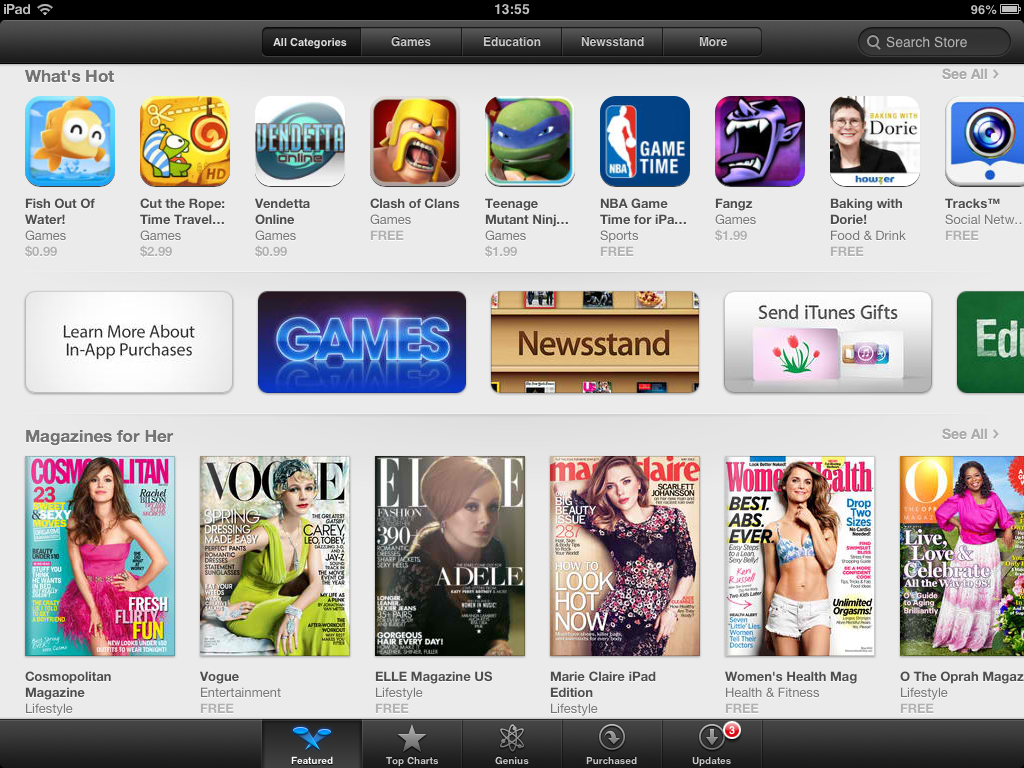
Apple has added a 'Learn More About In-App Purchases' section to the mobile App Store, reports AppAdvice.
The new section has likely been posted to help educate parents on how in-app purchases work and how they can restrict children from racking up charges while using certain applications.
What Are In-App Purchases? Many free and paid apps offer In-App Purchases - optional transactions designed to augment an app's functionality. You can only make In-App Purchases from an app that you've already downloaded. To find out if an app offers In-App Purchases, refer to the app's product page, near the Buy or Free button.
Types of In-App Purchases There are three types of In-App Purchases: Permanent enhancements like unlocking game levels, removing advertising, or expanding an app's feature set; expendable purchases, such as extra lives for a game character; and auto-renewing subscriptions (such as a monthly magazine that charges every 30 days).
How In-App Purchases Work On devices running iOS 4.3 or later, you must enter your password to make an In-App Purchase. Once you enter your password to make that purchase, additional In-App Purchases can be made without reentering your password for 15 minutes. To change your settings to require a password entry with every purchase, open Settings, tap General, then tap Restrictions, and change Require Password.
Parental Controls It’s easy to restrict your child’s ability to make In-App Purchases on an iOS device. Just open Settings, tap General, then tap Restrictions. Tap Enable Restrictions to find various parental control options, including the ability to turn off In-App Purchases.
Apple also recently updated the App Store to more prominently display which applications featured in-app purchases.
Get the iClarified Daily Newsletter
Apple news, rumors, tutorials, price drop alerts, in your inbox every evening, free.
Unsubscribe at any time.
Success!
You have been subscribed.
Add Comment
Would you like to be notified when someone replies or adds a new comment?
Yes (All Threads)
Yes (This Thread Only)
No
Notifications
Would you like to be notified when we post a new Apple news article or tutorial?







![Mac mini With M6 and M5 Pro Review Roundup [Video]](/images/news/102318/102318/102318-160.jpg "Mac mini With M6 and M5 Pro Review Roundup [Video]")
![Apple Releases macOS 27.2 Golden Gate Beta 2 to Developers [Download]](/images/news/102327/102327/102327-160.jpg "Apple Releases macOS 27.2 Golden Gate Beta 2 to Developers [Download]")









![Apple Studio Display XDR Hits All-Time Low of $2,969.99 ($329 Off) [Deal]](/images/news/101976/101976/101976-160.jpg "Apple Studio Display XDR Hits All-Time Low of $2,969.99 ($329 Off) [Deal]")
